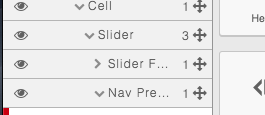
Add a title attribute to the Layers panel elements
Question
Hi @artf ,
When I have several elements nested in the Layers panel then some elements names are truncated because the Layer panel's width is not big enough, I know that custom resizable panel can be a solution but adding a title attribute would be enough for the majority of the use cases.

A tooltip (title) would be helpful to the user.
grapesjs/src/navigator/view/ItemView.js May be adding a title attribute to the follow line can do the job? https://github.com/artf/grapesjs/blob/7a23e20fe5138c37088ef05382f7c759cb6fa951/src/navigator/view/ItemView.js#L47
Example:
<div class="${pfx}layer-title-inn" title="${name}">
Let me know what do you think,
Thanks!
Answers (3)
Yeah, why not... would you like to create a PR? :)
@artf of course, thanks! I'm going to create the PR...
Thanks for reporting this, @Franci5co5aoco.
Great question about FEAT: Add a title attribute to the Layers panel elements. The recommended approach with GrapesJS is to use the event-driven API.
Start here:
- Check the GrapesJS documentation for your specific module
- Look for the
on()event listener method - Most operations can be achieved by listening to editor and component events
Common patterns:
// Listen for changes
editor.on('change', () => console.log('something changed'));
// Component lifecycle
editor.on('component:mount', (c) => console.log('component ready', c));
editor.on('component:update', (c) => console.log('component updated', c));
If you're still stuck:
- Share a minimal CodeSandbox reproduction
- Include what you've already tried
- Mention your GrapesJS version
- The community is here to help!
Related Questions and Answers
Continue research with similar issue discussions.
Issue #3458
FEAT: ADD CUSTOM BLOCKS (i.e iframe) and customise it like image i.e on double click it open assets options for video link in custom iframe block
WARNING READ and FOLLOW next 3 steps, then REMOVE them before posting the issueFollow CONTRIBUTING Guidelines https://github.com/artf/grape...
Issue #3561
FEAT: Enhanced Shadow DOM Support
What are you trying to add to GrapesJS? Better Shadow DOM support, allowing developers to render GrapesJS inside a Shadow element without h...
Issue #3405
FEAT: An event to hook into before a block in dropped into the canvas
WARNING READ and FOLLOW next 3 steps, then REMOVE them before posting the issueFollow CONTRIBUTING Guidelines https://github.com/artf/grape...
Issue #3369
FEAT: is it possible add a relative offset for the colorpicker
for example: I add a left bar and top bar outside the editor. I know the colorpicker's position is relative the body, so is it possible add...
Paid Plugins That Match This Issue
Curated by issue keywords and label relevance to help you ship faster.
Loading paid plugin recommendations...
Check the open-source GrapesJS plugins on GitHub or run a quick search in our free catalog.
Browse free plugins →Premium plugins ship with support, regular updates, and production-ready features — save days of integration work.
Browse premium plugins →Related tutorials
In-depth guides on the same topic.
Tutorial
How to Build a Production GrapesJS Editor: The Complete Walkthrough of Brief, Preset, Plugins, and Services
A complete walkthrough of building a production GrapesJS editor: how to choose a preset, pick plugins, and scope setup services without burning a sprint.
Tutorial
Big Updates: TinyMCE 8 and Placeholder 2.0 for GrapesJS
In May we shipped major updates to two of our most popular GrapesJS plugins — TinyMCE Inline Text Editor and Placeholder.
Tutorial
Find the Right GrapesJS Plugin in Seconds: Smarter Discovery Is Live
We're shipping a set of discovery upgrades. New label filters, a proper compatibility switch for GrapesJS vs Studio, one-click and a smarter sort bar.
Browse Plugin Categories
Jump directly to plugin category pages on the marketplace.