Having two instances of grape present makes the asset manager of the first "stop" working
OK so after a little bit more investigating, the real issue was due to how I was initiating the editors so my bad. I wasn't making sure the instances were truly separate and I was overwritting the first instance even though it appeared as normal without errors. I close this issue as it not a real bug report.
Read full answer below ↓Question
Version: 0.16.44
What is the expected behavior?
I expect to have 2 separate instances of grape in one single page and being able to utilize the asset manager properly
Describe the bug detailed
I have initialized 2 instances of grape in a page with the config below
ar editor = grapesjs.init({
fromElement: 1,
container: "#{{varName}}",
plugins: [...],
styleManager: false,
noticeOnUnload: false,
storageManager: false,
panels: {...},
assetManager: {
upload: '/api/handleEditorUpload',
uploadName: 'files',
},
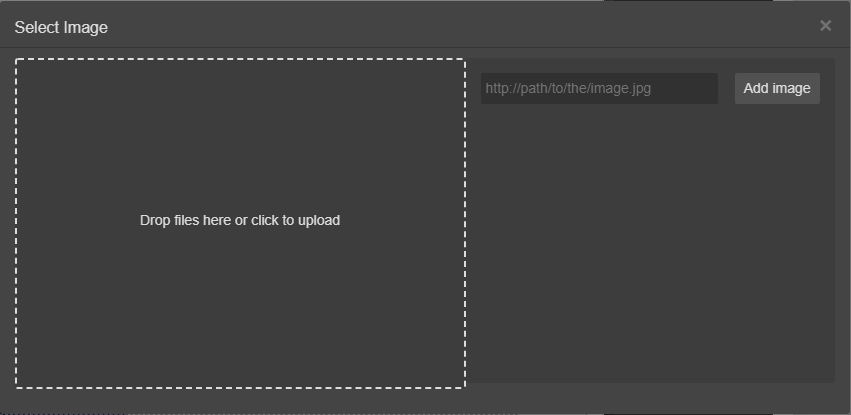
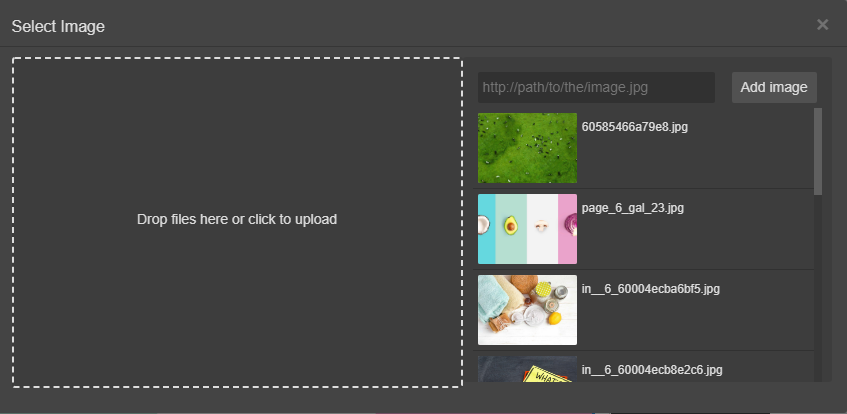
what happens is that in the second instance of the editor, the asset manager is working fine. On the contrary on the first instance the asset manager seems to be kind of broken. In the image below, you can see what is shown when I try to use the asset manager on the first instance. Here I have uploaded an image but it is nowhere to be seen.

BUT the image seems to be handled on the asset manager of the other instance as well as all other images already uploaded...

there is no error to be seen either. Any idea why this could be happening?
UPDATE this seems to be an issue with setting the assetManager on the init config of the editor if I comment out the asseManager: {..} part, suddenly the editor behaves as expected. How can I config this property and have it working ? I need to do the image handling myself.
Answers (2)
OK so after a little bit more investigating, the real issue was due to how I was initiating the editors so my bad. I wasn't making sure the instances were truly separate and I was overwritting the first instance even though it appeared as normal without errors. I close this issue as it not a real bug report.
Thanks for reporting this, @ThetripGr.
The issue with having two instances of grape present makes the asset manager of the first "stop" working appears to be a race condition or state management timing problem. This typically happens when component lifecycle events and DOM modifications overlap, creating an inconsistent state.
What to try:
- Add a setTimeout wrapper to ensure the DOM has settled:
setTimeout(() => {
// your operation here
}, 0);
-
Check initialization order — make sure components are fully loaded before you interact with them
-
Use the editor's event system — listen to completion events:
editor.on('component:mount', (component) => {
// safe to interact with component here
});
Recommended next steps:
- Test with the latest GrapesJS version if you haven't
- Provide a minimal reproducible example (CodeSandbox) — this helps the team identify the root cause faster
- Include GrapesJS version, browser, and console errors in your report
Related Questions and Answers
Continue research with similar issue discussions.
Issue #3613
Inconsistent Image Selection
Version: 0.17.19 Are you able to reproduce the bug from the demo?[X] Yes[ ] No Reproducible here. What is the expected behavior? Selecting...
Issue #3455
Style gets wiped out when inserting components in multiple page using Page Manager
Version: 0.17.3 What is the expected behavior? Style should be retained across multiple pages Describe the bug detailed We have use case wh...
Issue #3612
The grapesjs slider buttons, tabs are not working as expected
Version 0.17.19(grapesjs) Version 0.1.5(grapesjs-lory-slider) Version 1.0.6(grapesjs-tabs) Are you able to reproduce the bug from the demo?...
Issue #3434
Using imported HTML/CSS/JS into the editor shows outlines, but no content, JS Fiddle inside
You can get the version by typing grapesjs.version into the console YES: https://jsfiddle.net/75a9u1cf/2/ What is the expected behavior? I...
Paid Plugins That Match This Issue
Curated by issue keywords and label relevance to help you ship faster.
Loading paid plugin recommendations...
Check the open-source GrapesJS plugins on GitHub or run a quick search in our free catalog.
Browse free plugins →Premium plugins ship with support, regular updates, and production-ready features — save days of integration work.
Browse premium plugins →Related tutorials
In-depth guides on the same topic.
Tutorial
How to Build a Production GrapesJS Editor: The Complete Walkthrough of Brief, Preset, Plugins, and Services
A complete walkthrough of building a production GrapesJS editor: how to choose a preset, pick plugins, and scope setup services without burning a sprint.
Tutorial
GrapesJS Inline RTE Plugins Update: CKEditor 5 v0.1.4 and Froala Inline Text Editor
CKEditor 5 Inline for GrapesJS v0.1.4 fixes Studio SDK toolbar clipping, iframe injection and link balloon bugs. Compare with Froala Inline — both $69.
Tutorial
Embed GrapesJS in Your SaaS: A Weekend Guide
Embed GrapesJS in your SaaS and ship a white-label page builder over a weekend. Honest tradeoffs, real code, and the plugins that close the UX gap.
Browse Plugin Categories
Jump directly to plugin category pages on the marketplace.