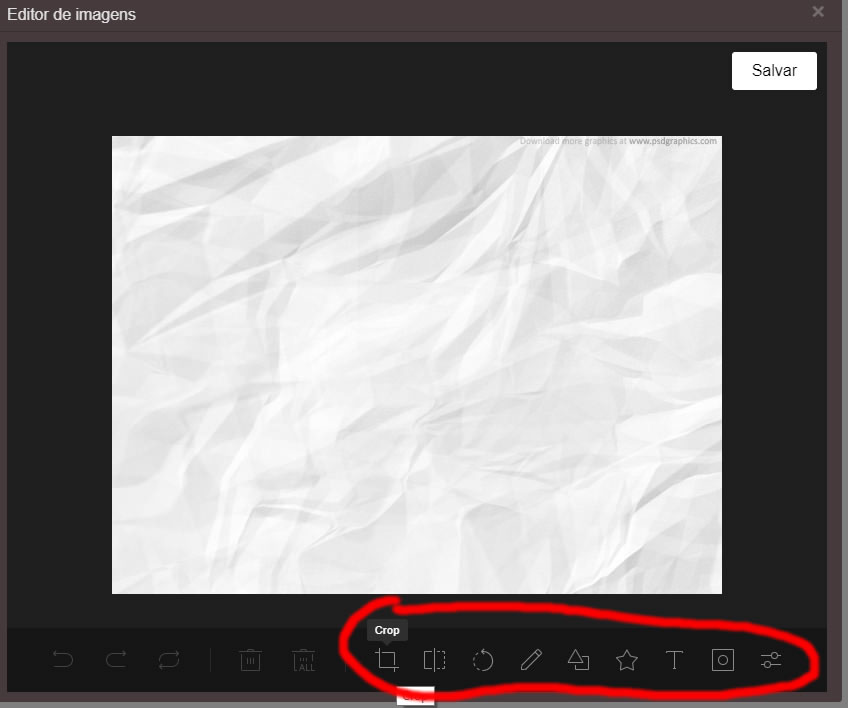
Translate image editor
I just found out how to do ... var localeptBR = { 'Crop': 'Cortar', 'Delete-all': 'Apagar tudo', 'Bold':'Negrito', 'Apply':'Aplicar', 'Arrow':'Seta', 'Arrow-2':'Seta 2', 'Arrow-3':'Seta 3', 'Blend':'Mistura', 'Blur':'Névoa', 'Brightness':'Brilho', 'Bubble':'Bolha', 'Cancel':'Cancelar', 'Center':'Centro', 'Circle':'Cír...
Read full answer below ↓Question
Does anyone know how to translate tools as "crop" "flip" in the image editor?

Answers (1)
I just found out how to do ...
`var locale_pt_BR = { 'Crop': 'Cortar', 'Delete-all': 'Apagar tudo', 'Bold':'Negrito', 'Apply':'Aplicar', 'Arrow':'Seta', 'Arrow-2':'Seta 2', 'Arrow-3':'Seta 3', 'Blend':'Mistura', 'Blur':'Névoa', 'Brightness':'Brilho', 'Bubble':'Bolha', 'Cancel':'Cancelar', 'Center':'Centro', 'Circle':'Círculo', 'Color':'Cor', 'Color Filter':'Filtro de cores', 'Custom':'Personalizados', 'Custom icon':'Ícone personalizado', 'Delete':'Apagar', 'Distance':'Distância', 'Color':'Cor', 'Download':'Download', 'Draw':'Desenhar', 'Emboss':'Gravar', 'Fill':'Preenchimento', 'Filter':'Filtro', 'Flip':'Virar', 'Flip X':'Virar na horizontal', 'Flip Y':'Virar na vertical', 'Free':'Livre', 'Grayscale':'Escala cinza', 'Heart':'Coração', 'Icon':'Ícone', 'Invert':'Invertido', 'Italic':'Itálico', 'Left':'Esquerda', 'Load':'Carregar', 'Load Mask Image':'Carregar imagem da máscara', 'Location':'Localização', 'Mask':'Máscara', 'Multiply':'Multiplicar', 'Noise':'Ruído', 'Pixelate':'Pixelado', 'Polygon':'Polígono', 'Range':'Alcance', 'Rectangle':'Retângulo', 'Redo':'Refazer', 'Remove White':'Remover branco', 'Reset':'Voltar', 'Right':'Direita', 'Rotate':'Rodar', 'Sepia':'Sépia', 'Sepia2':'Sépia 2', 'Shape':'Forma', 'Sharpen':'Aguçar', 'Square':'Quadrado', 'Star-1':'Estrela', 'Star-2':'Estrela 2', 'Straight':'Reto', 'Stroke':'Borda', 'Text':'Texto', 'Text size':'Tamanho do texto',
'Threshold':'Limite',
'Tint':'Matiz',
'Triangle':'Triângulo',
'Underline':'Sublinhado',
'Undo':'Desfazer',
'Value':'Valor',
};
var editor = grapesjs.init({
...
pluginsOpts: {
'grapesjs-tui-image-editor': {
config: {
includeUI: {locale: locale_pt_BR,},
},
labelApply:'Salvar',commandId:'editor-de-imagens',upload:'true' },
`Related Questions and Answers
Continue research with similar issue discussions.
Issue #2246
[QUESTIONS] how do I change the "Layer" in text shadow?
Hello, how do I change the "Layer" in text shadow. I need to translate this ... Thank you
Issue #2242
how do I change "- State -" and "Selected"
Hello, how do I change "- State -" and "Selected" I need to translate this ... Thank you
Issue #2381
[QUESTION] Is it possible to add info modal on the editor
Hi, I would like to add on the grapejs editor a clickable questionmark we can click so we could give information on what does this specific...
Issue #3369
FEAT: is it possible add a relative offset for the colorpicker
for example: I add a left bar and top bar outside the editor. I know the colorpicker's position is relative the body, so is it possible add...
Paid Plugins That Match This Issue
Curated by issue keywords and label relevance to help you ship faster.
Loading paid plugin recommendations...
Check the open-source GrapesJS plugins on GitHub or run a quick search in our free catalog.
Browse free plugins →Premium plugins ship with support, regular updates, and production-ready features — save days of integration work.
Browse premium plugins →Browse Plugin Categories
Jump directly to plugin category pages on the marketplace.