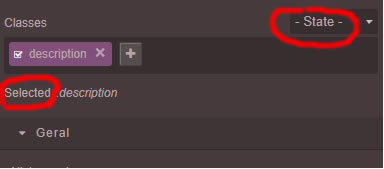
How do I change "- State -" and "Selected"
Question
Hello, how do I change "- State -" and "Selected" I need to translate this ...
Thank you

Answers (3)
Comes from selector manager configuration
grapesjs.init({
//...
selectorManager: {
statesLabel: '- State -',
selectedLabel: 'Selected',
}
})
Thank you! Where can I find a full map "map" for me to translate?
Sorry there is no full map at the moment, each module has its own options for strings
Related Questions and Answers
Continue research with similar issue discussions.
Issue #2246
[QUESTIONS] how do I change the "Layer" in text shadow?
Hello, how do I change the "Layer" in text shadow. I need to translate this ... Thank you
Issue #1837
How to change the label of traits?
I'd like change the labels of triats which are going to be french. Could you give a piece of example code? Thank you Artur
Issue #1826
[Question] How to add link to an image?
Hi Artur, How to add a link to this image? If i need to create a custom component, please give me some example code Artur.. Thank you so mu...
Issue #3389
MultiSelect some elements and change styles only work on the last selected element
Hi, when I MultiSelect some elements using shift, and change style in styleManager. Only the last clicked element will update the style. Ca...
Paid Plugins That Match This Issue
Curated by issue keywords and label relevance to help you ship faster.
Loading paid plugin recommendations...
Check the open-source GrapesJS plugins on GitHub or run a quick search in our free catalog.
Browse free plugins →Premium plugins ship with support, regular updates, and production-ready features — save days of integration work.
Browse premium plugins →Related tutorials
In-depth guides on the same topic.
Tutorial
How to Build a Production GrapesJS Editor: The Complete Walkthrough of Brief, Preset, Plugins, and Services
A complete walkthrough of building a production GrapesJS editor: how to choose a preset, pick plugins, and scope setup services without burning a sprint.
Tutorial
Embed GrapesJS in Your SaaS: A Weekend Guide
Embed GrapesJS in your SaaS and ship a white-label page builder over a weekend. Honest tradeoffs, real code, and the plugins that close the UX gap.
Tutorial
Big Updates: TinyMCE 8 and Placeholder 2.0 for GrapesJS
In May we shipped major updates to two of our most popular GrapesJS plugins — TinyMCE Inline Text Editor and Placeholder.
Browse Plugin Categories
Jump directly to plugin category pages on the marketplace.