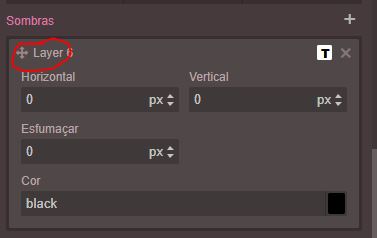
How do I change the "Layer" in text shadow?
I do not think you can do that... but you can change the html of the page when the style is added or updated using jquery or javascript. Like replace(/Layer/g, 'Other') in editor update.
Read full answer below ↓Question
Hello, how do I change the "Layer" in text shadow. I need to translate this ...
Thank you
Answers (3)
I do not think you can do that... but you can change the html of the page when the style is added or updated using jquery or javascript. Like replace(/Layer/g, 'Other') in editor update.
This is interesting ... but I can't implement it in practice.
Eu não acho que você pode fazer isso ... mas você pode alterar o html da página quando o estilo é adicionado ou atualizado usando jquery ou javascript. Como
replace(/Layer/g, 'Other')na atualização do editor.
How can I do this? It would be like this? editor= editor.replace(/Layer/g, "Other");
Related Questions and Answers
Continue research with similar issue discussions.
Issue #2242
how do I change "- State -" and "Selected"
Hello, how do I change "- State -" and "Selected" I need to translate this ... Thank you
Issue #1837
How to change the label of traits?
I'd like change the labels of triats which are going to be french. Could you give a piece of example code? Thank you Artur
Issue #1826
[Question] How to add link to an image?
Hi Artur, How to add a link to this image? If i need to create a custom component, please give me some example code Artur.. Thank you so mu...
Issue #2187
How to change the title for Image component on Hover?
Hello @artf , How can I change the title for my image component when I hover on it? LIke the highlighted text on this image: Thanks!
Paid Plugins That Match This Issue
Curated by issue keywords and label relevance to help you ship faster.
Loading paid plugin recommendations...
Check the open-source GrapesJS plugins on GitHub or run a quick search in our free catalog.
Browse free plugins →Premium plugins ship with support, regular updates, and production-ready features — save days of integration work.
Browse premium plugins →Browse Plugin Categories
Jump directly to plugin category pages on the marketplace.