Issue #2316✓ SolvedOpened October 8, 2019by kickbk10 reactions

Customizing the assets-manager view

快速解答by PriyankaPrabhu7

@kickbk did you achieve the custom asset manager ? If yes please share the code

Read full answer below ↓

Question

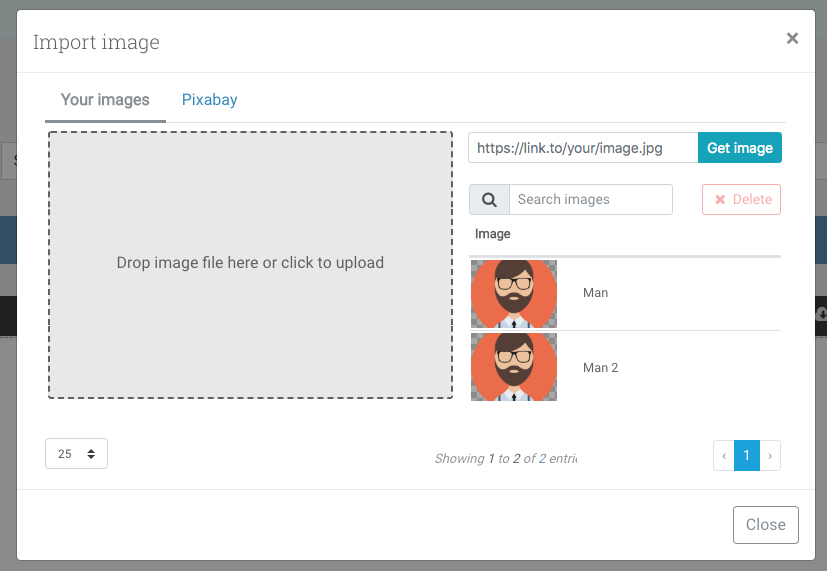
I would like to create a custom assets-manager modal to open in bootstrap modal. I'd like to keep the original assets manager functionality (like drop image zone, input to fetch image from remove, and I'd like to use datatable for the images/assets). In addition, I would like to integrate with Pixabay API so images can be easily entered into the editor. This can be in a separate tab. See mockup. Would you please offer some general guideline on how I can create a bootstrap modal in my view and load the assets manager inside it? mockupgrapes2

Answers (3)

👍 Most helpfulPriyankaPrabhuSeptember 24, 2021

@kickbk did you achieve the custom asset manager ? If yes please share the code

khoa-justunoOctober 8, 2019

You can do this with a custom modal by overwriting the default image asset manager.

editor.Commands.add("open-assets", {
  run(editor, sender, opts) {
    const assettarget = opts.target;
    // code to open your own modal goes here.
   openModal(assettarget)
  }
});

When you want to set an image use this.

const assettarget = opts.target;
assetTarget.set("src", image.url);
artfOctober 17, 2019

I'd suggest the same solution proposed by @khoa-justuno If you need a new modal it will be easier to create the Asset Manager UI from scratch, reusing the DOM elements created by GrapesJS, in this case, would be just a pain to maintain

Related Questions and Answers

Continue research with similar issue discussions.

Paid Plugins That Match This Issue

Curated by issue keywords and label relevance to help you ship faster.

View all plugins

Loading paid plugin recommendations...

Free option

Check the open-source GrapesJS plugins on GitHub or run a quick search in our free catalog.

Browse free plugins →
Premium option

Premium plugins ship with support, regular updates, and production-ready features — save days of integration work.

Browse premium plugins →

Related tutorials

In-depth guides on the same topic.

All tutorials →

Browse Plugin Categories

Jump directly to plugin category pages on the marketplace.