荧光笔和工具栏放错地方了
问题
你好,
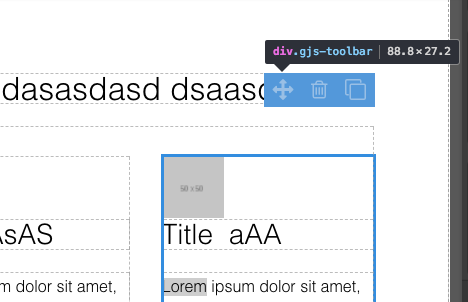
有时,我的画布上的荧光笔和工具栏会出现在错误的位置。这是已知的bug吗?我需要手动刷新画布吗?
看起来'gjs-highlighter'和'gjs-badge'上的“top”cs属性并没有被正确计算,它们水平上仍然对齐,只是垂直方向不对。有什么建议吗?
我在下面附上了截图。
谢谢, T
回答(3)
我知道工具栏在内容变化时会“跳”(通过添加或移除按钮),但用荧光笔时不会。你会在滚动页面中使用编辑器吗?
有什么方法可以在内容变化时停止跳跃吗?
是的,页面是滚动的。我应该限制编辑器的高度到浏览器的高度吗?
是的,不幸的是,有个bug,滚动页面的尺寸没有正确显示
相关问答
通过相似的问题讨论继续研究。
问题 #2044
本地服务器上的 NPM 开始开发失败了
按照 README 上描述的 'dev' 分支启动本地服务器的步骤,在控制台上能用,但在 Chrome 上失败,Grapesjs 也无法加载,因为以下错误  这样的颜色粘贴到边框颜色里,然后在编辑器里选择其他元素而不更改属性并重新按键,边框颜色就会变为 rgb(255),如果边框属性发生变化,CSS 就会失效。请检查并修复这个问题。如果有快速修复方法,请提供。...
问题 #1563
特性 - 更换视频提供商问题
版本: 0.14.40 漏洞: 当你更改“提供者”字段时,>所有设置都消失了。 这个问题发生在Chrome、Safari和Firefox上,都是最后版本。 如何复现:后藤 https://grapesjs.com/demo.html将 Basic 类别中的视频块拖入画布更改“提...
问题 #1513
在媒体查询下编写的重复CSS
嘿@artf项目做得很棒! 我注意到了一些东西,并且能在本地机器上复现。任何在“媒体查询”下写的“CSS”都会被重复/应用两次。 Grapesjs 版本 - '0.14.33' 浏览器 - “版本 69.0.3497.100(官方构建)(64位)” 操作系统 - “Window...
与此问题匹配的付费插件
根据问题关键词和标签相关性精选,助你更快交付。
正在加载付费插件推荐……
相关教程
关于同一主题的深入指南。
教程
Introducing Search on GJS.Market
GJS.Market now has one search across everything we publish — plugins, articles, community questions, guides, authors and services. Press ⌘K from any page.
教程
2026年构建一个SaaS页面构建器需要多少钱?
2026年构建一个SaaS页面构建器的成本是多少?探索实际的开发成本、时间表、功能,以及使用 GrapesJS 如何降低成本
教程
PageKit:你无论如何都得自己开发 GrapesJS 应用
一个围绕开源GrapesJS核心的源代码可用Next.js应用——发布、自定义域名、潜在客户、结账和插件加载器。
浏览插件分类
直接跳转到市场上的插件分类页面。