Issue #1513💬 AnsweredOpened October 14, 2018by yomeshgupta0 reactions

Duplicate CSS written under media queries

快速解答by yomeshgupta

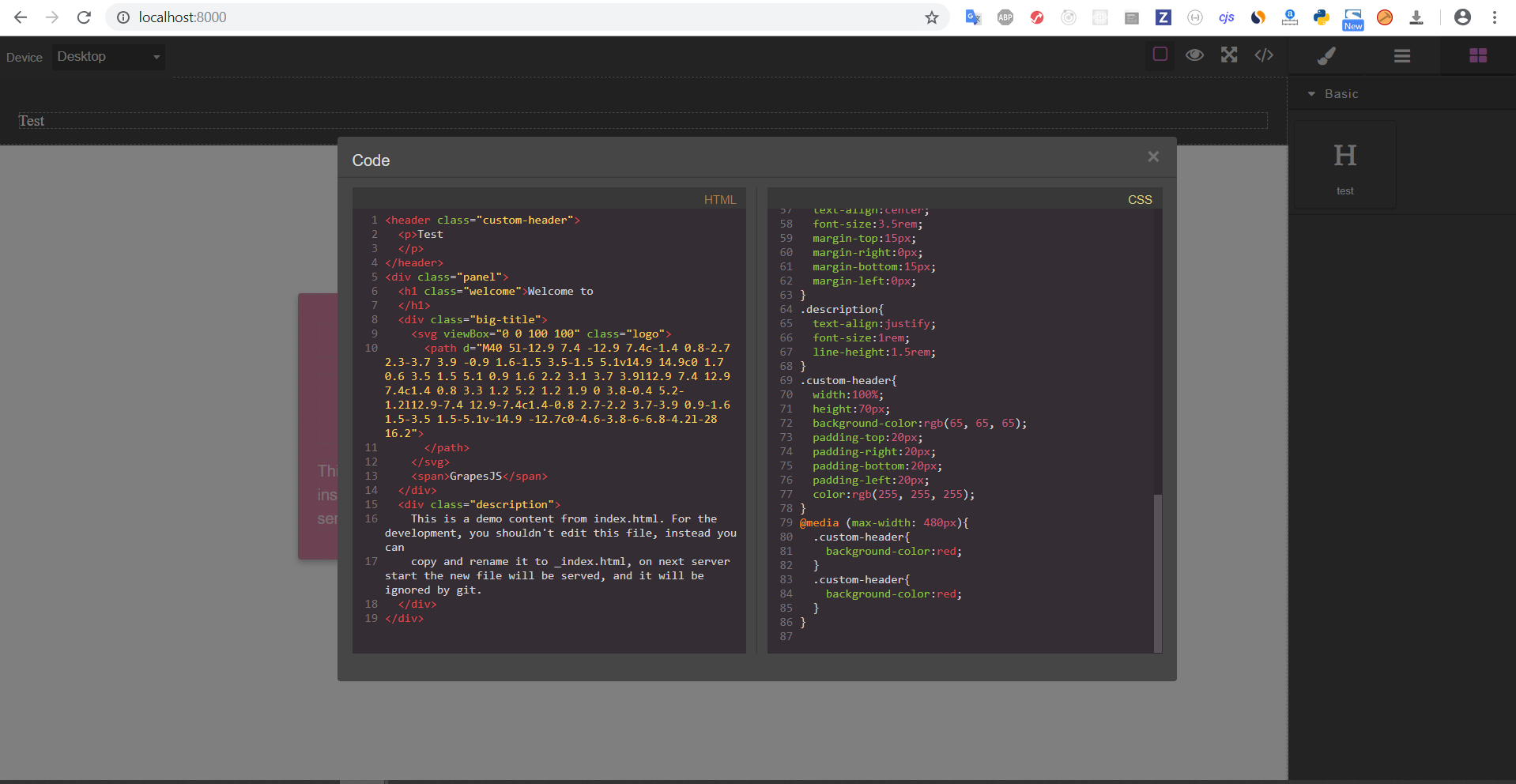
GrapeJs Editor Initialization Test Block Added Output @artf I am trying to add a custom block and providing HTML/CSS of the block via content attribute. When I drop the block onto the canvas then Media Query CSS is added twice to DOM Element with class gjs-css-rules-480px . It only happens if I provide CSS via content...

Read full answer below ↓

Question

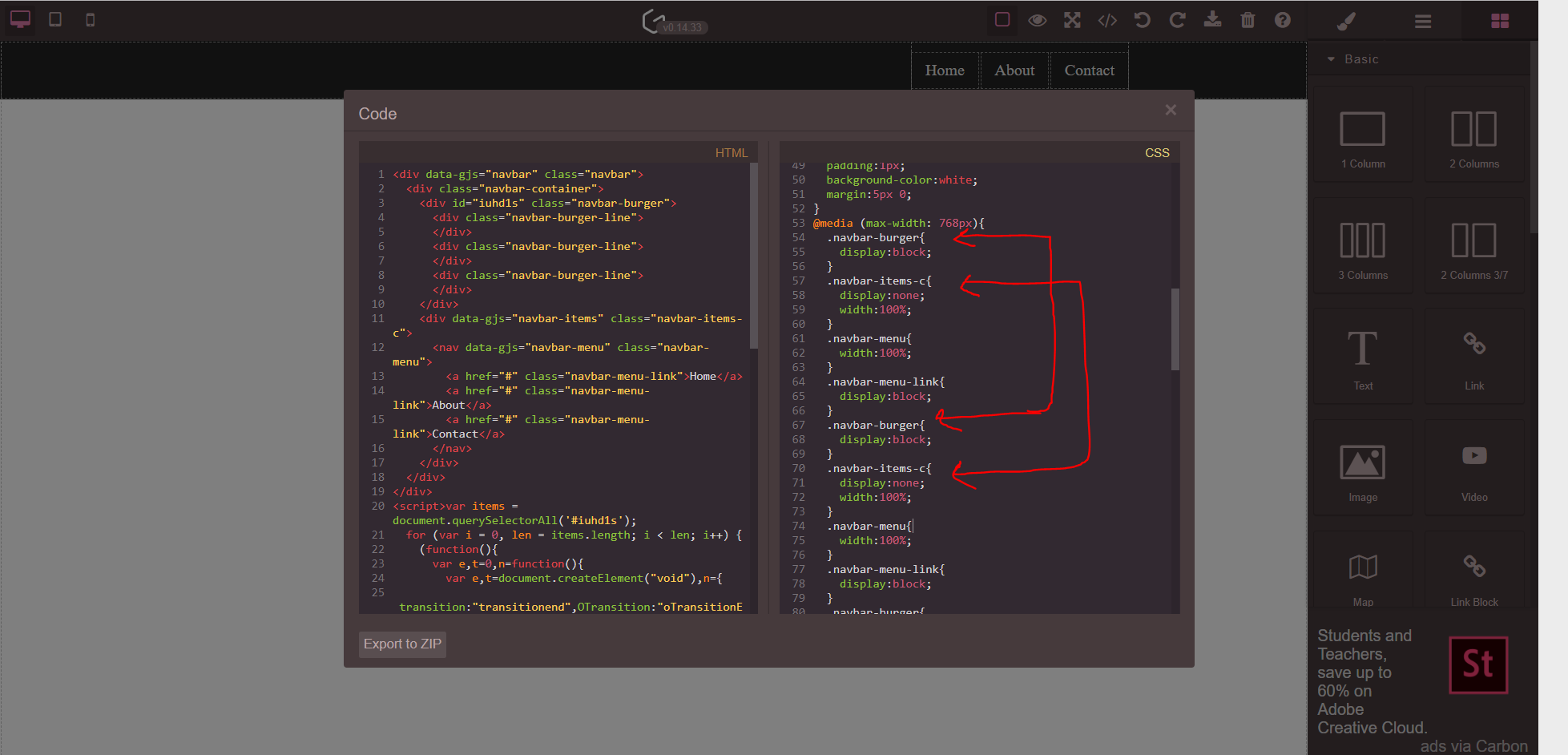
Hey @artf Great work on the project! I noticed something and I am able to reproduce it on my local machine too. Any css written under media queries is being duplicated/applied twice.

Grapesjs Version - 0.14.33 Browser - Version 69.0.3497.100 (Official Build) (64-bit) OS - Windows 10 Demo - https://grapesjs.com/demo.html

grapejs_1

Answers (3)

yomeshguptaOctober 19, 2018

GrapeJs Editor Initialization

var editor = grapesjs.init({
	showOffsets: 1,
	noticeOnUnload: 0,
	container: '#gjs',
	height: '100%',
	fromElement: true,
	storageManager: { autoload: 0 },
	styleManager: {
		sectors: [
			{
				name: 'General',
				open: false,
				buildProps: ['float', 'display', 'position', 'top', 'right', 'left', 'bottom']
			}, {
				name: 'Dimension',
				open: false,
				buildProps: ['width', 'height', 'max-width', 'min-height', 'margin', 'padding'],
			}, {
				name: 'Typography',
				open: false,
				buildProps: ['font-family', 'font-size', 'font-weight', 'letter-spacing', 'color', 'line-height', 'text-shadow'],
			}, {
				name: 'Decorations',
				open: false,
				buildProps: ['border-radius-c', 'background-color', 'border-radius', 'border', 'box-shadow', 'background'],
			}, {
				name: 'Extra',
				open: false,
				buildProps: ['transition', 'perspective', 'transform'],
			}, {
				name: 'Flex',
				open: false,
				properties: [
					{
						name: 'Flex Container',
						property: 'display',
						type: 'select',
						defaults: 'block',
						list: [
							{ value: 'block', name: 'Disable' },
							{ value: 'flex', name: 'Enable' }
						],
					}, {
						name: 'Flex Parent',
						property: 'label-parent-flex',
						type: 'integer',
					}, {
						name: 'Direction',
						property: 'flex-direction',
						type: 'radio',
						defaults: 'row',
						list: [{
							value: 'row',
							name: 'Row',
							className: 'icons-flex icon-dir-row',
							title: 'Row',
						}, {
							value: 'row-reverse',
							name: 'Row reverse',
							className: 'icons-flex icon-dir-row-rev',
							title: 'Row reverse',
						}, {
							value: 'column',
							name: 'Column',
							title: 'Column',
							className: 'icons-flex icon-dir-col',
						}, {
							value: 'column-reverse',
							name: 'Column reverse',
							title: 'Column reverse',
							className: 'icons-flex icon-dir-col-rev',
						}],
					}, {
						name: 'Justify',
						property: 'justify-content',
						type: 'radio',
						defaults: 'flex-start',
						list: [{
							value: 'flex-start',
							className: 'icons-flex icon-just-start',
							title: 'Start',
						}, {
							value: 'flex-end',
							title: 'End',
							className: 'icons-flex icon-just-end',
						}, {
							value: 'space-between',
							title: 'Space between',
							className: 'icons-flex icon-just-sp-bet',
						}, {
							value: 'space-around',
							title: 'Space around',
							className: 'icons-flex icon-just-sp-ar',
						}, {
							value: 'center',
							title: 'Center',
							className: 'icons-flex icon-just-sp-cent',
						}],
					}, {
						name: 'Align',
						property: 'align-items',
						type: 'radio',
						defaults: 'center',
						list: [{
							value: 'flex-start',
							title: 'Start',
							className: 'icons-flex icon-al-start',
						}, {
							value: 'flex-end',
							title: 'End',
							className: 'icons-flex icon-al-end',
						}, {
							value: 'stretch',
							title: 'Stretch',
							className: 'icons-flex icon-al-str',
						}, {
							value: 'center',
							title: 'Center',
							className: 'icons-flex icon-al-center',
						}],
					}, {
						name: 'Flex Children',
						property: 'label-parent-flex',
						type: 'integer',
					}, {
						name: 'Order',
						property: 'order',
						type: 'integer',
						defaults: 0,
						min: 0
					}, {
						name: 'Flex',
						property: 'flex',
						type: 'composite',
						properties: [{
							name: 'Grow',
							property: 'flex-grow',
							type: 'integer',
							defaults: 0,
							min: 0
						}, {
							name: 'Shrink',
							property: 'flex-shrink',
							type: 'integer',
							defaults: 0,
							min: 0
						}, {
							name: 'Basis',
							property: 'flex-basis',
							type: 'integer',
							units: ['px', '%', ''],
							unit: '',
							defaults: 'auto',
						}],
					}, {
						name: 'Align',
						property: 'align-self',
						type: 'radio',
						defaults: 'auto',
						list: [{
							value: 'auto',
							name: 'Auto',
						}, {
							value: 'flex-start',
							title: 'Start',
							className: 'icons-flex icon-al-start',
						}, {
							value: 'flex-end',
							title: 'End',
							className: 'icons-flex icon-al-end',
						}, {
							value: 'stretch',
							title: 'Stretch',
							className: 'icons-flex icon-al-str',
						}, {
							value: 'center',
							title: 'Center',
							className: 'icons-flex icon-al-center',
						}],
					}
				]
			}
		]
	}
});

Test Block Added

editor.on('load', function () {
	var $ = grapesjs.$;
	var pn = editor.Panels;

	// Load and show settings and style manager
	var openTmBtn = pn.getButton('views', 'open-tm');
	openTmBtn && openTmBtn.set('active', 1);
	var openSm = pn.getButton('views', 'open-sm');
	openSm && openSm.set('active', 1);

	// Add Settings Sector
	var traitsSector = $('<div class="gjs-sm-sector no-select">' +
		'<div class="gjs-sm-title"><span class="icon-settings fa fa-cog"></span> Settings</div>' +
		'<div class="gjs-sm-properties" style="display: none;"></div></div>');
	var traitsProps = traitsSector.find('.gjs-sm-properties');
	traitsProps.append($('.gjs-trt-traits'));
	$('.gjs-sm-sectors').before(traitsSector);
	traitsSector.find('.gjs-sm-title').on('click', function () {
		var traitStyle = traitsProps.get(0).style;
		var hidden = traitStyle.display == 'none';
		if (hidden) {
			traitStyle.display = 'block';
		} else {
			traitStyle.display = 'none';
		}
	});

	// Test Block
	editor.BlockManager.add('test', {
		label: 'test',
		category: 'Basic',
		attributes: { class: 'fa fa-header' },

		content: `
		<header data-gjs-type="default" data-gjs-droppable="true" class="custom-header">
			<p>Test</p>
		</header>
		<style>
			.custom-header {
				width: 100%;
				height: 70px;
				background-color: #414141;
				padding: 20px;
				color: #fff;
			}
			@media (max-width: 480px){
				.custom-header {
					background-color: red;
				}
			}
		</style>
		`
	});
})

Output

bug_screenshot_grapejs

@artf I am trying to add a custom block and providing HTML/CSS of the block via content attribute. When I drop the block onto the canvas then Media Query CSS is added twice to DOM Element with class gjs-css-rules-480px . It only happens if I provide CSS via content attribute. If I added any CSS using the StyleManager then it is rendered only once. Seems like issue with parsing CSS when initializing any block.

yomeshguptaOctober 19, 2018

Link to GrapeJS I am fetching - https://grapesjs.com/js/grapes.min.js?v0.14.33

In my debugging (might be wrong), in the file : ./src/css_composer/index.js When a rule is added

    /**
     * Add new rule to the collection, if not yet exists with the same selectors
     * @param {Array<Selector>} selectors Array of selectors
     * @param {String} state Css rule state
     * @param {String} width For which device this style is oriented
     * @param {Object} opts Other options for the rule
     * @return {Model}
     * @example
     * var sm = editor.SelectorManager;
     * var sel1 = sm.add('myClass1');
     * var sel2 = sm.add('myClass2');
     * var rule = cssComposer.add([sel1, sel2], 'hover');
     * rule.set('style', {
     *   width: '100px',
     *   color: '#fff',
     * });
     * */
    add: function add(selectors, state, width) {
      var opts = arguments.length > 3 && arguments[3] !== undefined ? arguments[3] : {};

      var s = state || '';
      var w = width || '';
      var opt = _extends({}, opts);
      var rule = this.get(selectors, s, w, opt);

      // do not create rules that were found before
      // unless this is an at-rule, for which multiple declarations
      // make sense (e.g. multiple `@font-type`s)
      if (rule && rule.config && !rule.config.atRuleType) {
        return rule;
      } else {
        opt.state = s;
        opt.mediaText = w;
        opt.selectors = '';
        rule = new CssRule(opt, c);
        rule.get('selectors').add(selectors);
        rules.add(rule);
        return rule;
      }
    },


    /**
     * Get the rule
     * @param {Array<Selector>} selectors Array of selectors
     * @param {String} state Css rule state
     * @param {String} width For which device this style is oriented
     * @param {Object} ruleProps Other rule props
     * @return  {Model|null}
     * @example
     * var sm = editor.SelectorManager;
     * var sel1 = sm.add('myClass1');
     * var sel2 = sm.add('myClass2');
     * var rule = cssComposer.get([sel1, sel2], 'hover');
     * // Update the style
     * rule.set('style', {
     *   width: '300px',
     *   color: '#000',
     * });
     * */
    get: function get(selectors, state, width, ruleProps) {
      var rule = null;
      rules.each(function (m) {
        if (rule) return;
        if (m.compare(selectors, state, width, ruleProps)) rule = m;
      });
      return rule;
    },

The rule is matched against existing rules, if not present then added else updated. Somehow, in the compare function it is not able to find the rule and which leads to adding it twice!

artfOctober 26, 2018

Thanks Yomesh, I'm investigating on this

Related Questions and Answers

Continue research with similar issue discussions.

Paid Plugins That Match This Issue

Curated by issue keywords and label relevance to help you ship faster.

View all plugins

Loading paid plugin recommendations...

Free option

Check the open-source GrapesJS plugins on GitHub or run a quick search in our free catalog.

Browse free plugins →
Premium option

Premium plugins ship with support, regular updates, and production-ready features — save days of integration work.

Browse premium plugins →

Related tutorials

In-depth guides on the same topic.

All tutorials →

Browse Plugin Categories

Jump directly to plugin category pages on the marketplace.