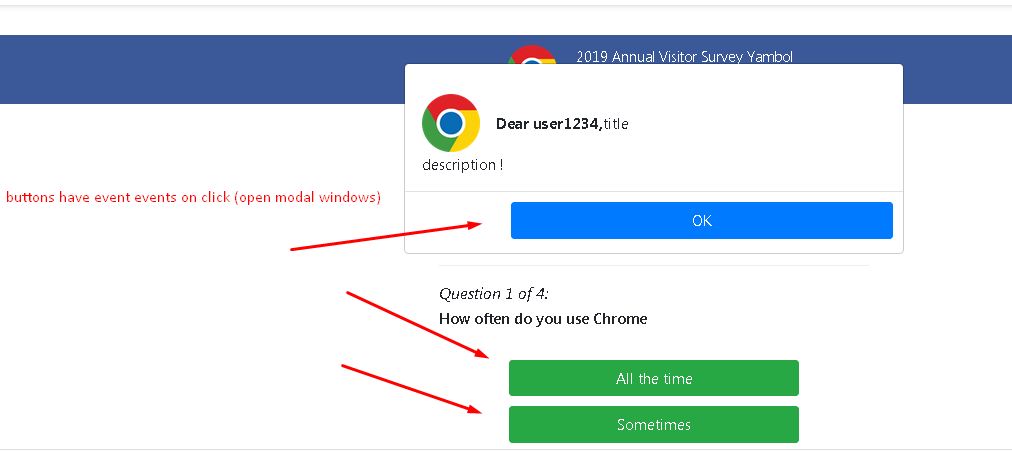
Button switcher to editor.allowsCripts
I'd recommend creating a custom component for those buttons to handle the logic with scripts
Read full answer below ↓Question
Hello, @artf ! :) Maybe you can help with grapesjs. I have buttons which has own scripts(e.g. opening modal window by click). And if I set property allowScripts: 0 - I can to edit these buttons, but if editor.allowScripts == 1, buttons execute logic(e.g. opening modal window) and I can't to edit buttons in that case. I found a great solution - it's switch property allowScripts = 0 : 1, but changes are only applied after page reload. How can I switch scripts? p.s execute command editor.refresh() after change a value allowScripts does not bring results

Answers (3)
I'd recommend creating a custom component for those buttons to handle the logic with scripts
@artf thank you very much! :+1:
Thanks for reporting this, @sashapawlow726.
Great suggestion about Button switcher to editor.allowsCripts! While this specific feature isn't yet in the core API, there are several ways to achieve similar behavior.
Using the event system:
editor.on('component:update', (component) => {
// your logic here
});
Alternative approaches:
- Listen to
selector:addfor CSS selector changes - Use
selector:customfor custom rules - Tap into the
change:*events for fine-grained tracking - Build a plugin that extends the editor with this capability
Making it official: If this feature would benefit many users, consider opening a formal Feature Request on the GrapesJS repo with:
- A detailed use case
- Code example showing the desired behavior
- Why this matters for your workflow
The core team is receptive to well-motivated feature requests backed by real use cases.
Related Questions and Answers
Continue research with similar issue discussions.
Issue #3245
grapesjs-custom-code doesn't execute <script> from GrapesJS 0.16.30 and up
grapesjs-custom-code work fine with script tag until GrapesJS 0.16.27, after this version, no script content is executed. ✔️ Editor init()...
Issue #3525
FEAT: In Style Manager, Allow Requiring the Default Setting
What are you trying to add to GrapesJS? The CSS property float only makes sense for position: static; elements, which happens to be the def...
Issue #3654
[QUESTIONS] editor.setComponents(html) and pageManager.select(pageId) not load js scripts
Hi, @artf As i have read allowScripts:1 allow grapesjs to load scripts . when i load a LandingPage first time it works fine . it load all j...
Issue #3313
There are lots of click required to make text editable, can we make text field editable on a single Click.
WARNING READ and FOLLOW next 3 steps, then REMOVE them before posting the issueFollow CONTRIBUTING Guidelines https://github.com/artf/grape...
Paid Plugins That Match This Issue
Curated by issue keywords and label relevance to help you ship faster.
Loading paid plugin recommendations...
Check the open-source GrapesJS plugins on GitHub or run a quick search in our free catalog.
Browse free plugins →Premium plugins ship with support, regular updates, and production-ready features — save days of integration work.
Browse premium plugins →Related tutorials
In-depth guides on the same topic.
Tutorial
Super Tooltip for GrapesJS — Version 0.1.5 Released 🎉
We’re excited to announce the v 0.1.5 update of Super Tooltip, our floating‑menu and tooltip plugin for GrapesJS
Tutorial
GrapesJS in 2026: The Complete Guide to the Open-Source Web Builder Framework
Master GrapesJS in 2026. Architecture, code examples, React integration, plugin development, Studio SDK, and how it compares to other projects
Browse Plugin Categories
Jump directly to plugin category pages on the marketplace.