Default PDF size: US letter How to set A4?
你好,Franco,你可以通过更改[devices](https://grapesjs.com/docs/api/device_manager.html)来定义帧大小。
阅读下方完整回答 ↓问题
警告
请阅读并遵循接下来的三步,然后在发布问题前删除它们
- JSFiddle 入门模板 https://jsfiddle.net/szLp8h4n
- CodeSandbox 入门模板 https://codesandbox.io/s/1r0w2pk1vl
**版本:0.16.3
你可以在控制台输入“grapesjs.version”获得版本
你能重现演示中的bug吗?
[X] 是的 [ ] 不
预期的行为是什么? 一个设置或文档,帮助开发定义PDF大小
详细描述那个漏洞** 这其实不算是bug,而是设置问题。 我无法将PDF尺寸改成A4,代码中找不到允许从A4开始的参数或配置
目前的行为是什么? 我用 grapesjs 在 invoiceninja 4.5.21 里构建模板。默认情况下,PDF尺寸是美式字母。
详细描述虫子**
你能附上截图、截屏或实时演示吗?
[ X ] 是的(附上) 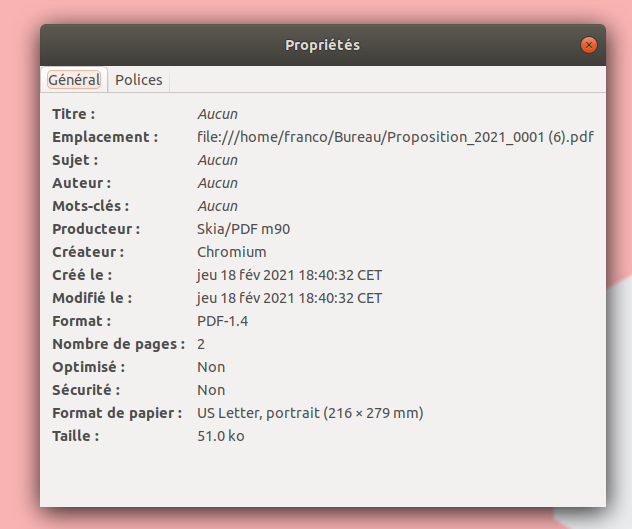
回答(2)
你好,Franco,你可以通过更改[devices](https://grapesjs.com/docs/api/device_manager.html)来定义帧大小。
谢谢你举报,@FrancoFasano。 默认PDF大小:美式字母 如何设置A4?的问题似乎是竞赛条件或状态管理时序问题。这通常发生在组件生命周期事件和DOM修改重叠时,导致状态不一致。 尝试什么: 添加setTimeout包装器以确保DOM已稳定: “JavaScript setTimeout(() => { 你在这里的行动 }, 0); 推荐的下一步步骤: 如果还没测试过,请用最新的GrapesJS版本测试 提供最小可重复的示例(CodeSandbox)——这有助于团队更快识别根本原因 在报告中包含 GrapesJS 版本、浏览器和控制台错误
相关问答
通过相似的问题讨论继续研究。
问题 #3463
Inspector overflow broken
警告 请阅读并遵循接下来的三步,然后在发布问题前删除它们遵守贡献指南 https://github.com/artf/grapesjs/blob/master/CONTRIBUTING.md先快速搜索一下,看看有没有人没开同样的问题所有相关陈述/问题都必须填写/回答,否则问题可...
问题 #3733
(或者只是一般问题)存储管理器加载不正确吗?
警告 请阅读并遵循接下来的三步,然后在发布问题前删除它们遵守贡献指南 https://github.com/artf/grapesjs/blob/master/CONTRIBUTING.md先快速搜索一下,看看有没有人没开同样的问题所有相关陈述/问题都必须填写/回答,否则问题可...
问题 #3382
Not able to add more than 2 projects under free version
警告 请阅读并遵循接下来的三步,然后在发布问题前删除它...
问题 #3700
Setting draggable: 'wrapper' does not drop in wrapper
警告 请阅读并遵循接下来的三步,然后在发布问题前删除它们遵守贡献指南 https://github.com/artf/grapesjs/blob/master/CONTRIBUTING.md先快速搜索一下,看看有没有人没开同样的问题所有相关陈述/问题都必须填写/回答,否则问题可...
与此问题匹配的付费插件
根据问题关键词和标签相关性精选,助你更快交付。
正在加载付费插件推荐……
相关教程
关于同一主题的深入指南。
教程
Introducing Search on GJS.Market
GJS.Market now has one search across everything we publish — plugins, articles, community questions, guides, authors and services. Press ⌘K from any page.
教程
如何在2026年用 GrapesJS 构建AI驱动的页面构建器
我们构建GJSDocs的经验——从简单的AI文本生成到结构化、上下文感知的视觉编辑
教程
2026年构建一个SaaS页面构建器需要多少钱?
2026年构建一个SaaS页面构建器的成本是多少?探索实际的开发成本、时间表、功能,以及使用 GrapesJS 如何降低成本
浏览插件分类
直接跳转到市场上的插件分类页面。