Issue #1510💬 AnsweredOpened October 12, 2018by himanshubudhlakoti0 reactions

How to add 2 columns at blockmanager in grapesjs

快速解答by himanshubudhlakoti

Hello All, if anyone is able in solving my issue mentioned above please let me know its urgent.

Read full answer below ↓

Question

Hello I am new in grapejs and using grapejs with angular6 i have seen Demo of grapesjs on .

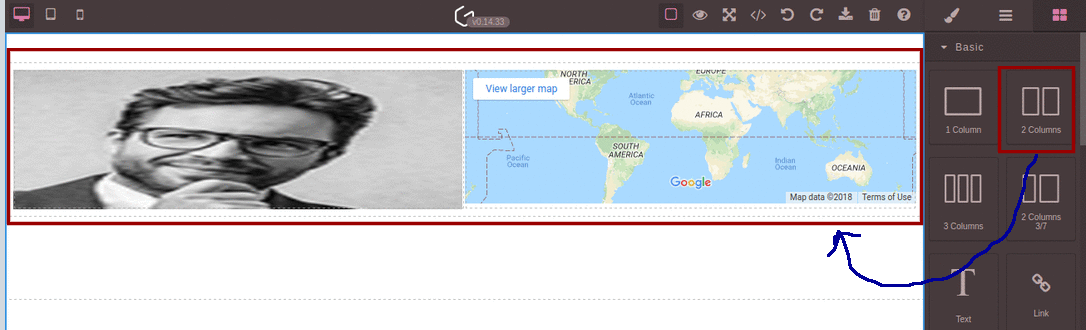
i want to create 2 columns at blockmanager as mentioned on below snapshot marked by red color 22

i want to add 2 columns at blockmanager and when i drop that column on canvas then it should be appeared as above snapshot looks .

i am using following code for doing same the code i copied from https://github.com/artf/grapesjs/wiki/Blocks

```this.editor = grapesjs.init({
   BlockManager:{

})```
 bm.add('the-row-block', {
      category : 'Basic',
      label: '2 Columns',
      content: '<div class="row" data-gjs-droppable=".row-cell" data-gjs-custom-name="Row">' +
          '<div class="row-cell" data-gjs-draggable=".row"></div>' +
          '<div class="row-cell" data-gjs-draggable=".row"></div>' +
        '</div>',
                
    });

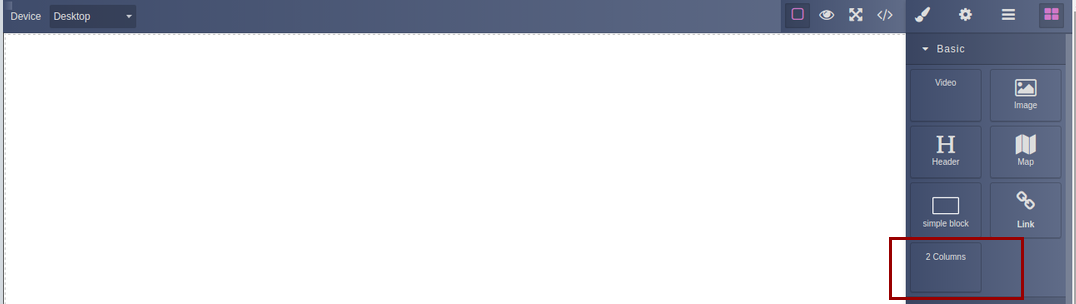
and output of my code is on the below screen

23

as you can see on above snapshot there is a component at right side of the screen in which 2 columns component is being displayed marked by red colored ractangle issue is when i drop that 2 columns component on the canvas it does not appear on the canvas

can anyone is able to resolve my issue. please help me as soon as possible

Answers (2)

himanshubudhlakotiOctober 15, 2018

Hello All, if anyone is able in solving my issue mentioned above please let me know its urgent.

lock[bot]October 15, 2019

This thread has been automatically locked since there has not been any recent activity after it was closed. Please open a new issue for related bugs.

Related Questions and Answers

Continue research with similar issue discussions.

Paid Plugins That Match This Issue

Curated by issue keywords and label relevance to help you ship faster.

View all plugins

Loading paid plugin recommendations...

Free option

Check the open-source GrapesJS plugins on GitHub or run a quick search in our free catalog.

Browse free plugins →
Premium option

Premium plugins ship with support, regular updates, and production-ready features — save days of integration work.

Browse premium plugins →

Related tutorials

In-depth guides on the same topic.

All tutorials →

Browse Plugin Categories

Jump directly to plugin category pages on the marketplace.