Custom block icon
嗨,@mingxin-yang,你可以阅读[这里](https://grapesjs.com/docs/modules/Blocks.html)如何创建和更新方块。 如果你需要更新方块的图标或标签,可以这样做: “''js 编辑。Blocks.get('BLOCK-ID').set({ 标签:“我的街区”, 媒体:“<SVG...”,// 例如:你的SVG图片 }) ```
阅读下方完整回答 ↓问题
我想自定义封锁图标,我找到了代码:
.gjs-f-text::before {
    内容:“O”;
}

.gjs-fonts::before {
    显示:方块;
    字体:普通普通 14px Font3336;
    文本渲染:自动;
    -webkit-font-smoothing:抗锯齿;
    -moz-osx-font-smoothing:灰度;
    字体大小:5em;
}
如何找到我想要的“内容”? 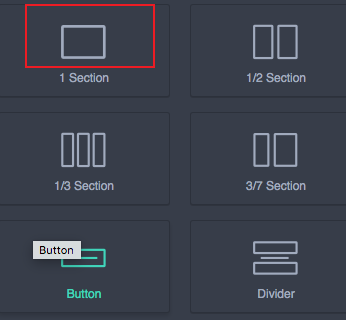
回答(2)
嗨,@mingxin-yang,你可以阅读[这里](https://grapesjs.com/docs/modules/Blocks.html)如何创建和更新方块。 如果你需要更新方块的图标或标签,可以这样做: “''js 编辑。Blocks.get('BLOCK-ID').set({ 标签:“我的街区”, 媒体:“<SVG...”,// 例如:你的SVG图片 })
谢谢你举报,@mingxin阳。 关于自定义方块图标的好问题。GrapesJS 推荐的方法是使用事件驱动 API。 从这里开始: 查看你所在模块的[GrapesJS文档](https://grapesjs.com/docs/) 寻找“on()”事件监听器方法 大多数操作可以通过监听编辑器和组件事件来实现 常见模式: “JavaScript 留意变化 editor.on('change', () => console.log('something changed')); 组件生命周期 editor.on('component:mount', (c) => console.log('compon...
相关问答
通过相似的问题讨论继续研究。
问题 #3315
Mm or cm Units are converted to px
我意识到毫米或厘米单位是可以转换成像素的。我该如何解决这个问题? 谢谢你 ,这是错了还是我做错了?我本以为资源不会显示出来,但它们全都可见 ![图片](https://user-images.githubus...
问题 #3504
我注意到有人使用了 font awesome 4.7 的早期版本。
我注意到有人使用了 font awesome 4.7 的早期版本。 我使用 fontawesome 5.2 版本,似乎在与 Grapes JS 版本同时加载时会出现问题,有些字体无法加载,或者新 fontawesome 字符集中的类名发生了变化。 我该如何使用 Fontawes...
与此问题匹配的付费插件
根据问题关键词和标签相关性精选,助你更快交付。
正在加载付费插件推荐……
相关教程
关于同一主题的深入指南。
教程
Introducing Search on GJS.Market
GJS.Market now has one search across everything we publish — plugins, articles, community questions, guides, authors and services. Press ⌘K from any page.
教程
如何在2026年用 GrapesJS 构建AI驱动的页面构建器
我们构建GJSDocs的经验——从简单的AI文本生成到结构化、上下文感知的视觉编辑
教程
2026年构建一个SaaS页面构建器需要多少钱?
2026年构建一个SaaS页面构建器的成本是多少?探索实际的开发成本、时间表、功能,以及使用 GrapesJS 如何降低成本
浏览插件分类
直接跳转到市场上的插件分类页面。