Upgrade - how to update old templates to the newest version?
它们有附加的职业,我看到最新版本不再向元素添加职业了。 我不太明白你说的是什么,职业应该像以前一样导入。背景:我们使用定制组件,且一些默认设置(例如可拖拽、可调整大小等、样式)已更改。 如果你的自定义组件依赖于之前的默认属性,你只需要更新组件,但说实话,我甚至不记得任何核心组件有这样的改动。 请让我看看一些模板代码加载不良。
阅读下方完整回答 ↓问题
我有一些模板是用v0.14.5生成的。我该如何“升级”到最新版本?它们有附加的职业,我看到最新版本不再给元素添加职业了。
背景:我们使用定制组件,一些默认设置(例如可拖拽、可调整大小等、样式)已经更改。
如果需要更多细节,我可以提供。
感谢你带来的这个精彩项目!
回答(4)
它们有附加的职业,我看到最新版本不再向元素添加职业了。
我不太明白你说的是什么,职业应该像以前一样导入。
背景:我们使用定制组件,且一些默认设置(例如可拖拽、可调整大小等、样式)已更改。
如果你的自定义组件依赖于之前的默认属性,你只需要更新组件,但说实话,我甚至不记得任何核心组件有这样的改动。
请让我看看一些模板代码加载不良。
嘿,谢谢你的快速回复。这是v0.14.5生成的模板 https://jsonblob.com/535ae06f-d4f6-11eb-8bc1-415e99da64cb
看起来就是这样 https://ibb.co/Zz8qg2J
我们更改了一些自定义组件的默认属性和样式,并更改了dragMode='absolute'。其中一个问题是旧部件无法移动。
如果需要,我可以提供代码示例。
我已经为现有模板设置了旧版本和新版本: https://grapesjs-templates-upgrade.ciprianamariei.repl.co/0.14.5-old-template.html https://grapesjs-templates-upgrade.ciprianamariei.repl.co/0.16.45-old-template.html 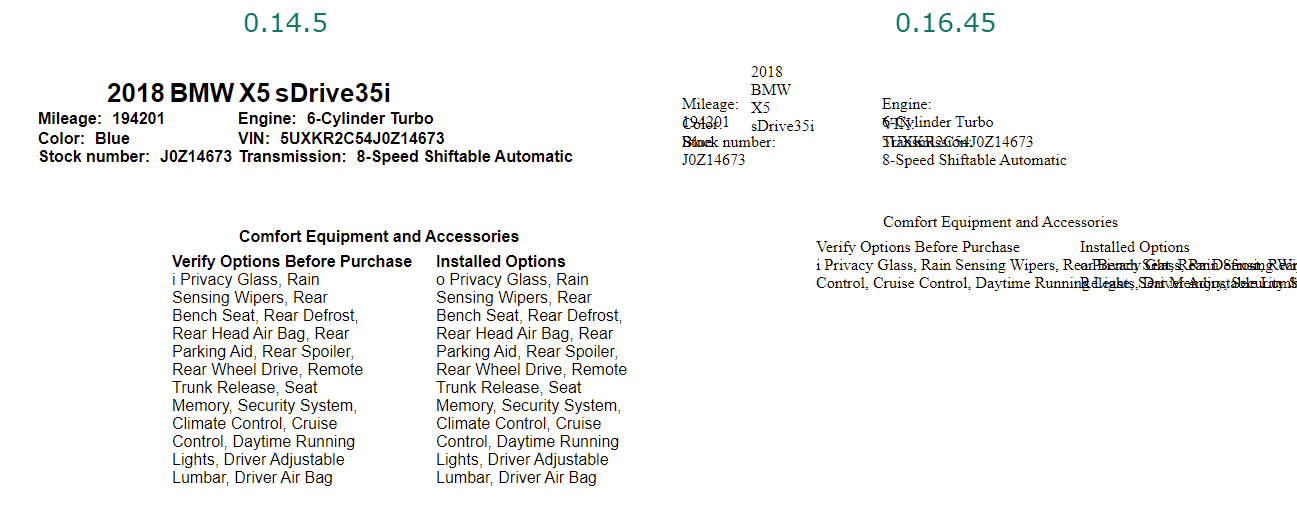
谢谢你举报,@acip。 关于升级——如何将旧模板更新到最新版本?的好问题。推荐的 StyleManager 方法是使用事件驱动的 API。 从这里开始: 查看你所在模块的[GrapesJS文档](https://grapesjs.com/docs/) 寻找“on()”事件监听器方法 大多数操作可以通过监听编辑器和组件事件来实现 常见模式: “JavaScript 留意变化 editor.on('change', () => console.log('something changed')); 组件生命周期 editor.on('component:mount', (c) => consol...
相关问答
通过相似的问题讨论继续研究。
问题 #4601
在切换某些目标时,添加到样式管理器的自定义类型 update() 不再被触发。
GrapesJS 版本 [X] 我确认使用最新版本 GrapesJS 你用的是什么浏览器? 铬104 可复制演示链接 https://jsfiddle.net/aw8p0h9j/ 描述一下那个虫子 如何复现这个漏洞?打开 jsfiddle 链接。点击两个div之间,然后在任一d...
问题 #3631
How to load dynamic content in the final HTML file?
我到处找过,包括问题部分,也尝试了几种方法。但真的不太确定如何在组件里总是加载动态内容(不仅仅是导出或通过编辑器保存时)。 我想在 grapejs 组件中加入一个脚本,它总是从网页抓取内容并更新组件。 比如,当我写博客并存储在数据库里时。现在每当有人访问我的着陆页(用 Grap...
问题 #3347
How can I get Uncompressed JS code for me to edit?
你好,感谢你帮我解答这个问题。我想用自己的JSEditor来编辑html、css和js。 1、首先,我用 'getHtml', 'getCss', 'getJs' 在我的 JSEditor 里显示代码。我发现JS代码是压缩的。我怎样才能获得无压缩代码? 我用的是'编辑器'。Co...
问题 #3225
How to Update Style from checkbox Trait?
你好@artf 我尝试用复选框特性更新样式,但它没有调用函数。 这是代码 非常感谢你能提供的任何见解! 谢谢
与此问题匹配的付费插件
根据问题关键词和标签相关性精选,助你更快交付。
正在加载付费插件推荐……
相关教程
关于同一主题的深入指南。
教程
Introducing Search on GJS.Market
GJS.Market now has one search across everything we publish — plugins, articles, community questions, guides, authors and services. Press ⌘K from any page.
教程
如何在2026年用 GrapesJS 构建AI驱动的页面构建器
我们构建GJSDocs的经验——从简单的AI文本生成到结构化、上下文感知的视觉编辑
教程
2026年构建一个SaaS页面构建器需要多少钱?
2026年构建一个SaaS页面构建器的成本是多少?探索实际的开发成本、时间表、功能,以及使用 GrapesJS 如何降低成本
浏览插件分类
直接跳转到市场上的插件分类页面。