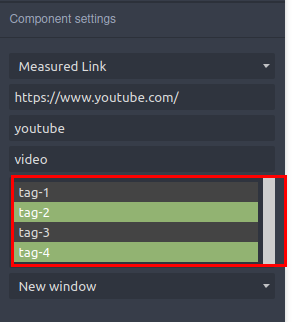
Integrate select2 UI element into traits
Question
I'm new to grapesJS ... Great tool.I have a few questions about traits. I followed this tutorial https://grapesjs.com/docs/modules/Traits.html#define-new-trait-type because I have to overwrite how href is generated. The example is great for me with few modifications. I I want to replace ....
<select multiple="multiple"> <option value="option"></option> ....... </select>

with select2 tagging. But I need something like onPostRender/afterRender to initialize the select2 component when the DOM is present
The available methods by the example are
createInput, onEvent, onUpdate
Another thing to trigger onEvent from select2
tagListElement.on('select2:select', function (evt) { // trigger trait onEvent method });
Can someone help with this?
Answers (3)
You can do this:
tagListElement.on('select2:select', e => this.onChange(e)); // onChange will trigger the onEvent properly
@artf thanks
Can you help with first part of the question I need something like onPostRender/afterRender to initialize the select2 component when the DOM is present somthing after createInput method
Thanks for reporting this, @iteniel.
Great question about [QUESTION]: Integrate select2 UI element into traits. The recommended approach with Components is to use the event-driven API.
Start here:
- Check the GrapesJS documentation for your specific module
- Look for the
on()event listener method - Most operations can be achieved by listening to editor and component events
Common patterns:
// Listen for changes
editor.on('change', () => console.log('something changed'));
// Component lifecycle
editor.on('component:mount', (c) => console.log('component ready', c));
editor.on('component:update', (c) => console.log('component updated', c));
If you're still stuck:
- Share a minimal CodeSandbox reproduction
- Include what you've already tried
- Mention your GrapesJS version
- The community is here to help!
Related Questions and Answers
Continue research with similar issue discussions.
Issue #3574
adding traits are not picked up by trait manager.
Following example from docs . Is there further configurtion to make new traitsa show for elements? The example using the input does not run...
Issue #3688
How to customize a component
I read this document https://grapesjs.com/docs/modules/Components.html#define-custom-component-type and tried to write the following code....
Issue #4384
index.d.ts says that components must be Backbone.Collection<Component> but the docs say Component[] is also accepted
GrapesJS version[X] I confirm to use the latest version of GrapesJSWhat browser are you using? AnyReproducible demo link https://grapesjs.c...
Issue #3258
Prevent/Disable Custom Blocks from being dropped inside other Custom Blocks
Hello, I have a custom component, let's call it a Section Block. I want to prevent the user from dropping Section Blocks inside other Secti...
Paid Plugins That Match This Issue
Curated by issue keywords and label relevance to help you ship faster.
Loading paid plugin recommendations...
Check the open-source GrapesJS plugins on GitHub or run a quick search in our free catalog.
Browse free plugins →Premium plugins ship with support, regular updates, and production-ready features — save days of integration work.
Browse premium plugins →Related tutorials
In-depth guides on the same topic.
Tutorial
How to Build a Production GrapesJS Editor: The Complete Walkthrough of Brief, Preset, Plugins, and Services
A complete walkthrough of building a production GrapesJS editor: how to choose a preset, pick plugins, and scope setup services without burning a sprint.
Tutorial
GrapesJS vs Webflow vs Builder.io vs Puck: Which Visual Builder to Choose in 2026
A practitioner's 2026 comparison of GrapesJS, Webflow, Builder.io, and Puck — pricing, AI features, lock-in, and a one-line rule for picking the right one
Tutorial
GrapesJS vs Webflow vs Tilda (2026): Honest Comparison, Pricing & Which to Pick
GrapesJS vs Webflow vs Tilda compared head-to-head: real 2026 pricing, SEO features, code export, and which one actually fits your project
Browse Plugin Categories
Jump directly to plugin category pages on the marketplace.