Allow dynamic droppable configuration using a function
Question
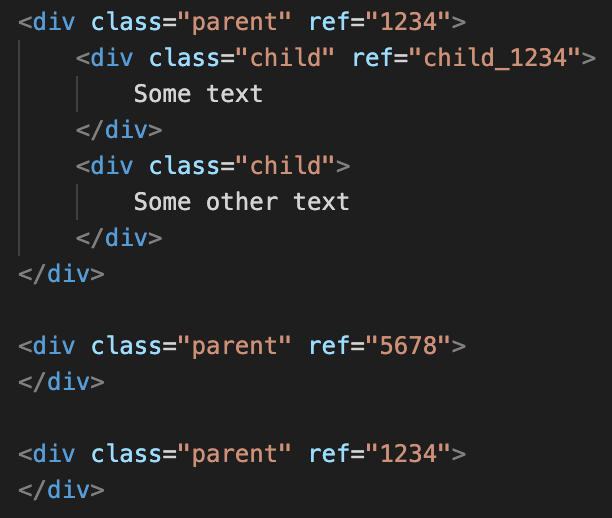
I have a requirement where I cannot use selectors to determine if an element is droppable. For example:

The "child" component must be within a "parent" component, however if the child component contains a ref attribute it can only be dragged into other parent containers that match the same ref value as the current parent. Given the above markup, the child component can be dropped into the last container but not the container with the ref of 5678. However the second child element could be dropped into any of the parent components.
This would easily be accomplished if droppable would allow a function:
droppable: (src, target) => {
//some logic
return true;
},
This would require a fairly simple change to the Sorter:
// Check if the target could accept the source
let droppable = trgModel.get('droppable');
if (typeof droppable === 'function') {
let res = droppable(src, trg);
result.droppable = res;
result.dropInfo = res;
droppable = res;
} else {
//existing logicAnswers (3)
Associated PR: https://github.com/artf/grapesjs/pull/3393
@artf do have any questions regarding this feature or the approach taken in the PR?
Thanks for reporting this, @rywilson28.
Great suggestion about FEAT: Allow dynamic droppable configuration using a function! While this specific feature isn't yet in the core API, there are several ways to achieve similar behavior.
Using the event system:
editor.on('component:update', (component) => {
// your logic here
});
Alternative approaches:
- Listen to
selector:addfor CSS selector changes - Use
selector:customfor custom rules - Tap into the
change:*events for fine-grained tracking - Build a plugin that extends the editor with this capability
Making it official: If this feature would benefit many users, consider opening a formal Feature Request on the GrapesJS repo with:
- A detailed use case
- Code example showing the desired behavior
- Why this matters for your workflow
The core team is receptive to well-motivated feature requests backed by real use cases.
Related Questions and Answers
Continue research with similar issue discussions.
Issue #3561
FEAT: Enhanced Shadow DOM Support
What are you trying to add to GrapesJS? Better Shadow DOM support, allowing developers to render GrapesJS inside a Shadow element without h...
Issue #3140
Interactive component in canvas
I am building a quiz builder plugin using grapesjs. I was wondering if we can add a component which is interactive and adds new components...
Issue #3688
How to customize a component
I read this document https://grapesjs.com/docs/modules/Components.html#define-custom-component-type and tried to write the following code....
Issue #3231
how to change gjs-ckeditor-format component
hi guys, we all know that gjs-ckeditor-plugin working with [data-gjs-type]="text" components. I wanna know , could we change this option? I...
Paid Plugins That Match This Issue
Curated by issue keywords and label relevance to help you ship faster.
Loading paid plugin recommendations...
Check the open-source GrapesJS plugins on GitHub or run a quick search in our free catalog.
Browse free plugins →Premium plugins ship with support, regular updates, and production-ready features — save days of integration work.
Browse premium plugins →Related tutorials
In-depth guides on the same topic.
Tutorial
How to Build a Production GrapesJS Editor: The Complete Walkthrough of Brief, Preset, Plugins, and Services
A complete walkthrough of building a production GrapesJS editor: how to choose a preset, pick plugins, and scope setup services without burning a sprint.
Tutorial
Embed GrapesJS in Your SaaS: A Weekend Guide
Embed GrapesJS in your SaaS and ship a white-label page builder over a weekend. Honest tradeoffs, real code, and the plugins that close the UX gap.
Tutorial
Big Updates: TinyMCE 8 and Placeholder 2.0 for GrapesJS
In May we shipped major updates to two of our most popular GrapesJS plugins — TinyMCE Inline Text Editor and Placeholder.
Browse Plugin Categories
Jump directly to plugin category pages on the marketplace.