Issue #3303💬 AnsweredOpened March 2, 2021by RutujaBadbe1 reactions

Category order not displaying properly

快速解答by Ju99ernaut1

I guess you can make this a feature request, I'm not sure if something like this exists yet in grapesjs. Though the order of the blocks might be easier to manage if you split each category's blocks into different files then load those files in order.

Read full answer below ↓

Question

Hi! I want to display the categories in block manager in certain sequence. I looked into docs and previous issues and found about order attribute. So, I tried setting order attribute. but it is not yet displaying in that order even though order attribute is getting set. Am I missing something? or doing something wrong?

what I am doing is:

var categories = editor.BlockManager.getCategories();
categories.map(category => {
    //console.log(category.id);
    switch (category.id) {
        case 'Header':
            category.order=1;
            break;
        case 'Carousel Banner':
            category.order=2;
            break;
        case 'Sections':
            category.order=3;
            break;
        case 'Category':
            category.order=4;
            break;
        case 'News Letter':
            category.order=5;
            break;
        case 'Footer':
            category.order=6;
            break;
        default:
            break;
    }
});

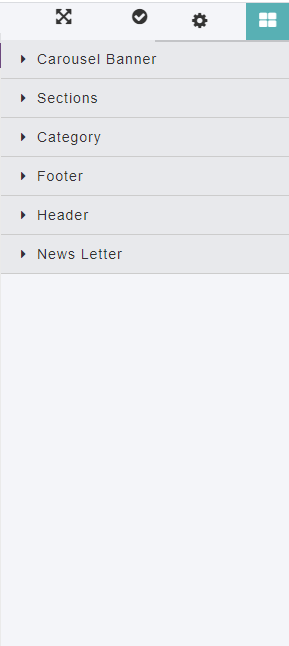
so, expected result is to see categories in sequence- Header, Carousel Banner, Section, Category, News Letter , Footer

but what I am still getting is this- Capture

Answers (4)

Ju99ernautMarch 8, 2021

I guess you can make this a feature request, I'm not sure if something like this exists yet in grapesjs. Though the order of the blocks might be easier to manage if you split each category's blocks into different files then load those files in order.

Ju99ernautMarch 6, 2021

I think the order in which blocks are added is what determines category order.

RutujaBadbeMarch 8, 2021

@Ju99ernaut hi! Thanks for the reply. yes. At the end I did that. but what if I want to do it dynamically? if there are many blocks, isn't it hard to maintain the order?

ClaudeCodeMay 17, 2026

Thanks for reporting this, @RutujaBadbe.

Great question about Category order not displaying properly. The recommended approach with GrapesJS is to use the event-driven API.

Start here:

  1. Check the GrapesJS documentation for your specific module
  2. Look for the on() event listener method
  3. Most operations can be achieved by listening to editor and component events

Common patterns:

// Listen for changes
editor.on('change', () => console.log('something changed'));

// Component lifecycle
editor.on('component:mount', (c) => console.log('component ready', c));
editor.on('component:update', (c) => console.log('component updated', c));

If you're still stuck:

  • Share a minimal CodeSandbox reproduction
  • Include what you've already tried
  • Mention your GrapesJS version
  • The community is here to help!

Related Questions and Answers

Continue research with similar issue discussions.

Paid Plugins That Match This Issue

Curated by issue keywords and label relevance to help you ship faster.

View all plugins

Loading paid plugin recommendations...

Free option

Check the open-source GrapesJS plugins on GitHub or run a quick search in our free catalog.

Browse free plugins →
Premium option

Premium plugins ship with support, regular updates, and production-ready features — save days of integration work.

Browse premium plugins →

Related tutorials

In-depth guides on the same topic.

All tutorials →

Browse Plugin Categories

Jump directly to plugin category pages on the marketplace.