Textable attribute not working and causing exceptions
问题
版本: 0.16.27 至最新 你能重现演示中的bug吗? 是的 [X] 是的 [ ] 不 预期的行为是什么? 将文本块插入另一个文本块内 详细描述那个漏洞 在添加新块,甚至创建新的自定义类型时,“textable属性”并未如预期和描述那样工作。此前没有类似报道, 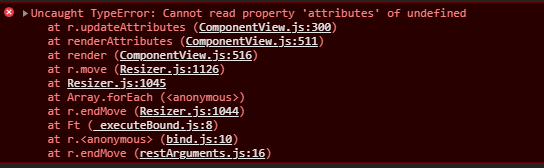 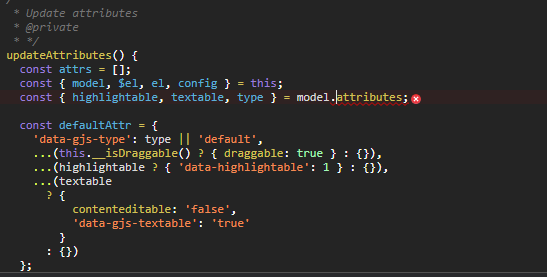 目前的行为是什么?* 我在拖放元素时出现错误(如附图所示, 我正在本地试玩试玩版, 添加的元素为: '编辑。BlockManager.add('my-text-test', { 标签:“简单地图块”, 内容:{ 类型:“文本”, 可移除:正确, 内容:'测试', Droppable:确实如此, 高亮:1, 可复制:true, 可拖曳:1, 可编辑:1, 可发短信:1 } })` 如果需要更多细节,请告诉我,我很乐意分享, 谢谢你 详细描述虫子 你能附上截图、截屏或实时演示吗?* [X] 是的...
回答(2)
#2771的复制品
谢谢你举报,@hanna404。 Textable属性无法工作并引发异常的问题似乎是竞态条件或状态管理时序问题。这通常发生在组件生命周期事件和DOM修改重叠时,导致状态不一致。 尝试什么: 添加setTimeout包装器以确保DOM已稳定: “JavaScript setTimeout(() => { 你在这里的行动 }, 0); 推荐的下一步步骤: 如果还没测试过,请用最新的GrapesJS版本测试 提供最小可重复的示例(CodeSandbox)——这有助于团队更快识别根本原因 在报告中包含 GrapesJS 版本、浏览器和控制台错误
相关问答
通过相似的问题讨论继续研究。
问题 #3457
Custom trait input not working
你好@artf! 版本:0.17.3 你能重现演示中的bug吗?[ ] 是的[x] 不 预期的行为是什么? 输入是正确的 详细描述那个漏洞 我正在尝试创建一个自定义输入(复选框),但不行。 目前的行为是什么? 见附件。 你能附上截图、截屏或实时演示吗?**[x] 是(附上)[...
问题 #3579
在放置“activeOnRender”组件后立即打开RTE时丢失了
版本: 0.17.4 你能重现演示中的bug吗?[x] 是的[ ] 不 繁殖步骤:前往[演示](https://grapesjs.com/demo.html)在画布内放置一个“文本”方块点击刚刚丢弃的“文本”组件打开的RTE丢失了位置(参见[附图](https://user-i...
问题 #4947
Undo manager not working properly on undoing a remove action
GrapesJS 版本[X] 我确认使用最新版本 GrapesJS你用的是什么浏览器? Chrome - 版本 110.0.5481.100(官方构建)(arm64)可复制演示链接 https://codepen.io/faisal-praella/pen/ExeNwxJ描述一...
问题 #4173
Text element does not work properly
GrapesJS 版本[X] 我确认使用最新版本 GrapesJS你用的是什么浏览器? Chrome v98可复制演示链接 https://grapesjs.com/demo.html描述一下那个虫子 我打开了一个笔记本(Win11) 我在记事本上写了:测试 [回车] 测试 [...
与此问题匹配的付费插件
根据问题关键词和标签相关性精选,助你更快交付。
正在加载付费插件推荐……
相关教程
关于同一主题的深入指南。
教程
Introducing Search on GJS.Market
GJS.Market now has one search across everything we publish — plugins, articles, community questions, guides, authors and services. Press ⌘K from any page.
教程
2026年构建一个SaaS页面构建器需要多少钱?
2026年构建一个SaaS页面构建器的成本是多少?探索实际的开发成本、时间表、功能,以及使用 GrapesJS 如何降低成本
教程
PageKit:你无论如何都得自己开发 GrapesJS 应用
一个围绕开源GrapesJS核心的源代码可用Next.js应用——发布、自定义域名、潜在客户、结账和插件加载器。
浏览插件分类
直接跳转到市场上的插件分类页面。