Textable attribute not working and causing exceptions
Question
Version: 0.16.27 to latest
Are you able to reproduce the bug from the demo? Yes [ X] Yes [ ] No
What is the expected behavior? insert text block inside another text block Describe the bug detailed
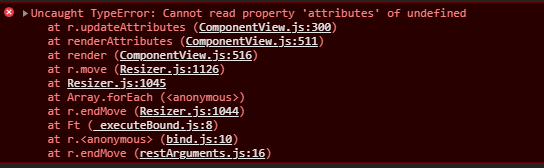
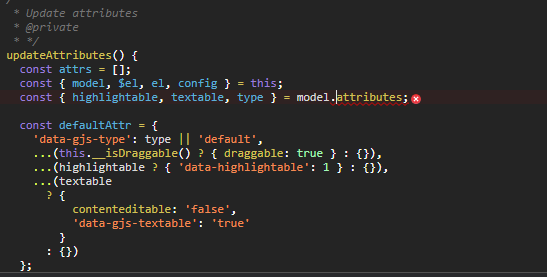
when adding new block, or even when creating a new custom type, the "textable attribute is not working as expected and as described. Nothing similar was reported before,
What is the current behavior?
i am getting an error when dragging and dropping the element (as you can see the images attached,
I am trying on the demo locally ,
the added element is :
` editor.BlockManager.add('my-text-test', {
label: 'Simple map block',
content: {
type: 'text',
removable: true,
content:'test',
droppable: true,
highlightable:1,
copyable:true,
draggable: 1,
editable:1,
textable: 1
} })`
let me know if further details are required i will be happy to share them, thank you Descripe the bug detailed
Are you able to attach screenshots, screencasts or a live demo?
[ X] Yes (attach) [ ] No
Answers (2)
Duplicate of #2771
Thanks for reporting this, @hanna404.
The issue with Textable attribute not working and causing exceptions appears to be a race condition or state management timing problem. This typically happens when component lifecycle events and DOM modifications overlap, creating an inconsistent state.
What to try:
- Add a setTimeout wrapper to ensure the DOM has settled:
setTimeout(() => {
  // your operation here
}, 0);
-
Check initialization order — make sure components are fully loaded before you interact with them
-
Use the editor's event system — listen to completion events:
editor.on('component:mount', (component) => {
  // safe to interact with component here
});
Recommended next steps:
- Test with the latest GrapesJS version if you haven't
- Provide a minimal reproducible example (CodeSandbox) — this helps the team identify the root cause faster
- Include GrapesJS version, browser, and console errors in your report
Related Questions and Answers
Continue research with similar issue discussions.
Issue #3731
Text element not able to be selected twice after extended with events
Version: 0.17.25 Are you able to reproduce the bug from the demo?[ ] Yes[x] No What is the expected behavior? Update a existing component o...
Issue #3475
Toolbar/actionbar buttons do not work when there are multiple instances present (Even in your demo)
Version: 0.16.44 You can get the version by typing grapesjs.version into the console Are you able to reproduce the bug from the demo?[x] Ye...
Issue #3319
layers text does not center after creating a new line
Version: current? You can get the version by typing grapesjs.version into the console Are you able to reproduce the bug from the demo? [ ]...
Issue #3622
I18n functionality
Version: latest Are you able to reproduce the bug from the demo?[] Yes[ ] No What is the expected behavior? to editor.I18n.setLocale("es")...
Paid Plugins That Match This Issue
Curated by issue keywords and label relevance to help you ship faster.
Loading paid plugin recommendations...
Check the open-source GrapesJS plugins on GitHub or run a quick search in our free catalog.
Browse free plugins →Premium plugins ship with support, regular updates, and production-ready features — save days of integration work.
Browse premium plugins →Related tutorials
In-depth guides on the same topic.
Tutorial
How to Build a Production GrapesJS Editor: The Complete Walkthrough of Brief, Preset, Plugins, and Services
A complete walkthrough of building a production GrapesJS editor: how to choose a preset, pick plugins, and scope setup services without burning a sprint.
Tutorial
GrapesJS Inline RTE Plugins Update: CKEditor 5 v0.1.4 and Froala Inline Text Editor
CKEditor 5 Inline for GrapesJS v0.1.4 fixes Studio SDK toolbar clipping, iframe injection and link balloon bugs. Compare with Froala Inline — both $69.
Tutorial
Embed GrapesJS in Your SaaS: A Weekend Guide
Embed GrapesJS in your SaaS and ship a white-label page builder over a weekend. Honest tradeoffs, real code, and the plugins that close the UX gap.
Browse Plugin Categories
Jump directly to plugin category pages on the marketplace.