How to make 4 properties in one row,like padding,margin
Question
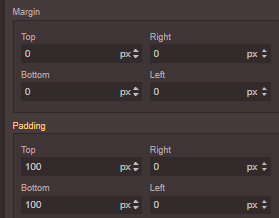
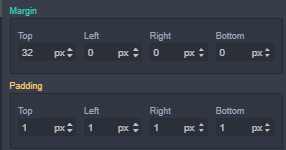
How could I control the properties to be show in one row or two, like the demos?
When I download the project grapesjs-preset-newsletter to local, also shows padding and margin in two rows which is puzzling.
In fact,I would like to put them flexible with customized rows and columns. Or at least, 4 properties can be controled in one row.
Answers (2)
Just use the CSS
Thanks for reporting this, @chenjingling90.
Great question about FEAT: how to make 4 properties in one row,like padding,margin. The recommended approach with GrapesJS is to use the event-driven API.
Start here:
- Check the GrapesJS documentation for your specific module
- Look for the
on()event listener method - Most operations can be achieved by listening to editor and component events
Common patterns:
// Listen for changes
editor.on('change', () => console.log('something changed'));
// Component lifecycle
editor.on('component:mount', (c) => console.log('component ready', c));
editor.on('component:update', (c) => console.log('component updated', c));
If you're still stuck:
- Share a minimal CodeSandbox reproduction
- Include what you've already tried
- Mention your GrapesJS version
- The community is here to help!
Related Questions and Answers
Continue research with similar issue discussions.
Issue #3344
FEAT: I am trying to get js using getJs() method but i am getting null value. How I can get js?
Issue #3683
How to set the component cannot be deleted
Issue #3315
mm or cm Units are converted to px
I realized that mm or cm units are converted to px. How can i solve this problem? Thank you
Issue #3444
removeButton() causing error
Hi, I'm trying to remove a button from panel using this code editor.Panels.removeButton('options', 'fullscreen') . It removes the button bu...
Paid Plugins That Match This Issue
Curated by issue keywords and label relevance to help you ship faster.
Loading paid plugin recommendations...
Check the open-source GrapesJS plugins on GitHub or run a quick search in our free catalog.
Browse free plugins →Premium plugins ship with support, regular updates, and production-ready features — save days of integration work.
Browse premium plugins →Related tutorials
In-depth guides on the same topic.
Tutorial
How to Build a Production GrapesJS Editor: The Complete Walkthrough of Brief, Preset, Plugins, and Services
A complete walkthrough of building a production GrapesJS editor: how to choose a preset, pick plugins, and scope setup services without burning a sprint.
Tutorial
Big Updates: TinyMCE 8 and Placeholder 2.0 for GrapesJS
In May we shipped major updates to two of our most popular GrapesJS plugins — TinyMCE Inline Text Editor and Placeholder.
Tutorial
Find the Right GrapesJS Plugin in Seconds: Smarter Discovery Is Live
We're shipping a set of discovery upgrades. New label filters, a proper compatibility switch for GrapesJS vs Studio, one-click and a smarter sort bar.
Browse Plugin Categories
Jump directly to plugin category pages on the marketplace.