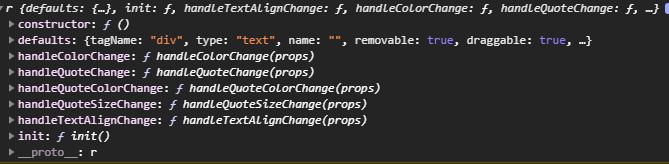
Creating a new component type does not inherit the functions of it's parent type
nvm , I revisited the docs more carefully, I somehow missed this about extending parent functions
Read full answer below ↓Question
Hello, I am trying to create a new common trait shared among all components by creating the following plugin
function backgroundColors(editor) {
editor.DomComponents.getTypes().map(type => {
var model = type.model;
editor.DomComponents.addType(type.id, {
model: {
defaults: {
traits: [{
type: 'select',
options: [
{ value: 'gjs_bgColor_teal', name: 'Teal' }
],
label: 'Background Color',
name: 'bgColor',
changeProp: 1
}].concat(model.prototype.defaults.traits),
},
init() {
this.listenTo(this, 'change:bgColor', this.handleBgColorChange);
},
handleBgColorChange() {
alert('background color changed');
}
},
});
})
}
on another plugin file I am also creating a new component type same way following the docs, called extendedText which uses the text type as it's basis. While the text type has the handleBgColorChange() as shown below

the new type branching from text does not

how do I pass down the parent type functions?
Answers (2)
nvm , I revisited the docs more carefully, I somehow missed this about extending parent functions
domc.addType('new-type', {
extend: 'parent-type',
extendFn: ['init'], // array of model functions to extend from `parent-type`
model: {
init() {
// do something
},
}
});
Thanks for reporting this, @ThetripGr.
Great question about Creating a new component type does not inherit the functions of it's parent type. The recommended approach with Components is to use the event-driven API.
Start here:
- Check the GrapesJS documentation for your specific module
- Look for the
on()event listener method - Most operations can be achieved by listening to editor and component events
Common patterns:
// Listen for changes
editor.on('change', () => console.log('something changed'));
// Component lifecycle
editor.on('component:mount', (c) => console.log('component ready', c));
editor.on('component:update', (c) => console.log('component updated', c));
If you're still stuck:
- Share a minimal CodeSandbox reproduction
- Include what you've already tried
- Mention your GrapesJS version
- The community is here to help!
Related Questions and Answers
Continue research with similar issue discussions.
Issue #3541
[QUESTION] What is the idiomatic way to append and remove classes from components?
Hey there 👋 Love the editor! We're using traits to modify what classes a component has, but that feels a bit hacky as you have to redeclar...
Issue #3574
adding traits are not picked up by trait manager.
Following example from docs . Is there further configurtion to make new traitsa show for elements? The example using the input does not run...
Issue #3170
Add class name from traits
Hello, what i am trying to achieve is to have the text component extended by assigning an extra trait named Alignment and deciding through...
Issue #3316
The editor does not remove the dead script blocks
Version: 0.16.34 Are you able to reproduce the bug from the demo? [ ] Yes [x ] No As I understand the code import dialog skips all the HTML...
Paid Plugins That Match This Issue
Curated by issue keywords and label relevance to help you ship faster.
Loading paid plugin recommendations...
Check the open-source GrapesJS plugins on GitHub or run a quick search in our free catalog.
Browse free plugins →Premium plugins ship with support, regular updates, and production-ready features — save days of integration work.
Browse premium plugins →Related tutorials
In-depth guides on the same topic.
Tutorial
How to Build a Production GrapesJS Editor: The Complete Walkthrough of Brief, Preset, Plugins, and Services
A complete walkthrough of building a production GrapesJS editor: how to choose a preset, pick plugins, and scope setup services without burning a sprint.
Tutorial
Embed GrapesJS in Your SaaS: A Weekend Guide
Embed GrapesJS in your SaaS and ship a white-label page builder over a weekend. Honest tradeoffs, real code, and the plugins that close the UX gap.
Tutorial
Big Updates: TinyMCE 8 and Placeholder 2.0 for GrapesJS
In May we shipped major updates to two of our most popular GrapesJS plugins — TinyMCE Inline Text Editor and Placeholder.
Browse Plugin Categories
Jump directly to plugin category pages on the marketplace.