Disable <table> being auto amended during save
啊,如果我用这个 https://github.com/artf/grapesjs-custom-code,保存时不会修改 html。 但使用“gjs-preset-newsletter”时,这个方法无法实现。 因为如果你运行命令 'gjs-get-inlined-html',它会修改代码。 E.g. HTML代码: 运行 'gjs-get-inlined-html',它输出: 我猜你没办法阻止这种情况吧?
阅读下方完整回答 ↓问题
我遇到了一个问题,当保存自定义HTML组件(只是一个表格)时, grapes JS会修改它。
存档之后。 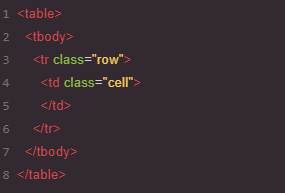
所以我想能够插入一个表格,因为我想用 twig(一种模板语言)进行门通 :
<table>
{% for item in items %}
   <tr>
   {{ item.name }}
   </tr>
{% endfor %}
</table>
我相信它和#606有关,但我看不出这是否能解决我遇到的问题。
它也与#1939有关联
有没有可能禁用这个功能?
理想情况下,要有一个HTML组件,内容不能被 grapesjs以任何方式修改。
谢谢, 亚当
回答(3)
啊,如果我用这个 https://github.com/artf/grapesjs-custom-code,保存时不会修改 html。 但使用“gjs-preset-newsletter”时,这个方法无法实现。 因为如果你运行命令 'gjs-get-inlined-html',它会修改代码。 E.g. HTML代码: 运行 'gjs-get-inlined-html',它输出: 我猜你没办法阻止这种情况吧?
你不能插入无效的HTML。如果你需要处理这些,你必须创建一个[自定义组件](https://grapesjs.com/docs/modules/Components.html),然后它会输出自定义代码。
谢谢你举报,@adamwpe。 关于FEAT:关闭<table>存档时自动修改的好建议!虽然这个具体功能还没有出现在核心 API 中,但有几种方法可以实现类似的行为。 使用事件系统: “JavaScript editor.on('component:update', (component) => { 你的逻辑 }); ``` 替代方法: 听取“selector:add”以获取CSS选择器更改 使用“selector:custom”来表示自定义规则 利用“change:*”事件进行细致跟踪 构建一个插件,扩展编辑器并具备此功能 正式宣布: 如果此功能能惠及更多用户,考虑在 GrapesJS 仓...
相关问答
通过相似的问题讨论继续研究。
问题 #3138
Prevent <TABLE>from being modified during saving.
大家好, 我遇到了一个问题,当保存自定义HTML组件(只是一个表格)时,Grapes JS会修改它。 保存之前 。 如果能同时更改所有这些属性会很不错。比如说,有个锁定按钮,启用后会同时更改所有属性,而不是一个一个。它可能看起来像这样: ...
与此问题匹配的付费插件
根据问题关键词和标签相关性精选,助你更快交付。
正在加载付费插件推荐……
相关教程
关于同一主题的深入指南。
教程
Introducing Search on GJS.Market
GJS.Market now has one search across everything we publish — plugins, articles, community questions, guides, authors and services. Press ⌘K from any page.
教程
GJS.Market Is Now Available for India 🇮🇳
GJS.Market is expanding its global presence with a dedicated experience for developers, agencies, SaaS companies, and digital creators in India
教程
如何在2026年用 GrapesJS 构建AI驱动的页面构建器
我们构建GJSDocs的经验——从简单的AI文本生成到结构化、上下文感知的视觉编辑
浏览插件分类
直接跳转到市场上的插件分类页面。