BUG:默认样式管理器的值为 em 或 %
问题
版本 16.17 你能重现演示中的bug吗? [ ] 是的 [ ] 不 预期的行为是什么? 我可以设置样式管理器,这样我就能展示所有单位、deault单元以及参数的值,参数使用大小值(字体大小、行高填充等)。 详细描述那个漏洞 当设置样式管理器只用em和%来设置大小相关时,单位选择器被更改时,显示的值在我看来是x 16,所以我设为1,结果是16。 代码: const lineHeight = styleManager.getProperty('typography', 'line-height'); lineHeight.set('units', [ "", “嗯” ]); lineHeight.set(“step”,“0.1”); lineHeight.set('min',0.1); lineHeight.set('max',100); lineHeight.set('unit', “”); lineHeight.set('value',1); 这里我预计线高设为1,单位值为空。但我明白 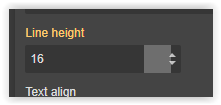 目前的行为是什么? 当预设能正常工作时,样式管理器中显示的最终值会显示“px”...
回答(3)
你好,@ksn-systems,你们能制作一个可复现的演示吗?
我也有同样的问题。我尝试将编辑器加载时默认字体大小设置为20px。你有解决这个问题的方法吗?
相关问答
通过相似的问题讨论继续研究。
问题 #2507
默认字体大小单位和值
嗨 我正在一个项目中使用grapesjs,项目处处使用比例缩放。根据你的建议,我现在可以默认字体大小选择器为“他们”,并让“他们”成为唯一的选项。 editor.on('load', function () { const styleManager = editor.Style...
问题 #4601
在切换某些目标时,添加到样式管理器的自定义类型 update() 不再被触发。
GrapesJS 版本 [X] 我确认使用最新版本 GrapesJS 你用的是什么浏览器? 铬104 可复制演示链接 https://jsfiddle.net/aw8p0h9j/ 描述一下那个虫子 如何复现这个漏洞?打开 jsfiddle 链接。点击两个div之间,然后在任一d...
问题 #2716
在Grapejs中添加自定义字体的问题
@artf 我按照下面的方法成功添加了列表中的字体,但并非所有字体都显示正确行为,我想在系统中添加Avenir字体,添加时并没有把字体改成Avenir,而是给了某个默认值 editor.on('load', function () { styleManager = 编辑器。风格...
问题 #2748
滑块不适用于非整数步进值
默认的StyleManager属性“滑块”无法处理非整数步长值。 GrapesJS 版本:0.16.1 在许多情况下,使用步长值非整数的滑块很方便: ![GrapesJS](https://user-images.githubusercontent.com/34565082/8...
与此问题匹配的付费插件
根据问题关键词和标签相关性精选,助你更快交付。
正在加载付费插件推荐……
浏览插件分类
直接跳转到市场上的插件分类页面。