BUG:用Jest测试时无法运行预览模式
我忘了在当前文档中添加编辑器包裹元素,所以我初始化的编辑器在DOM中不存在 12行的解法: <img width=“488” alt=“solution” src=“https://user-images.githubusercontent.com/48758473/90397413-77f2a000-e0a0-11ea-9f99-c8d43fef06c8.png”>
阅读下方完整回答 ↓问题
版本: 0.15.10 嗨! 我用 Jest 来测试我的Grapes.js组件。我需要在编辑器中的编辑模式和预览模式中测试组件的行为Grapes.js。在编辑模式下测试时一切正常,但当我需要在预览模式下测试时,我尝试运行脚本 'editor.runCommand('preview')',结果出现错误。测试在node.js中运行正常,但我成功在谷歌开发者面板中调试了它,这样我们可以从内部操作代码。 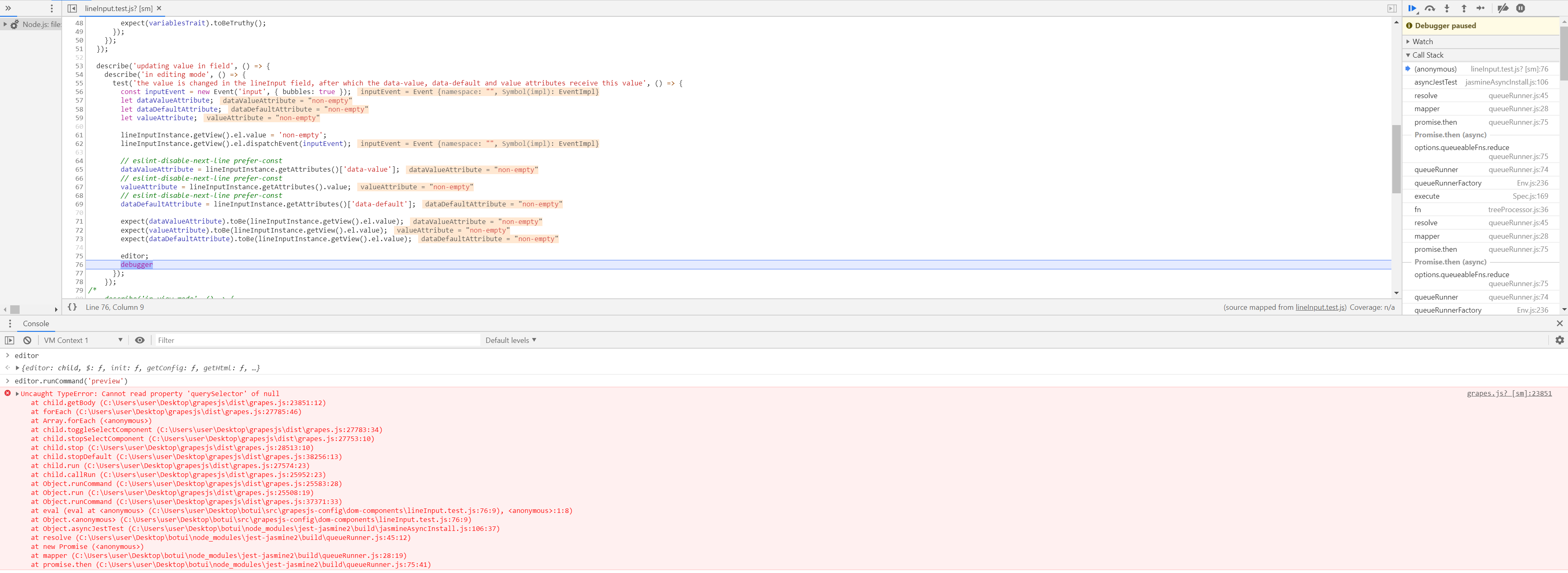 如果出现错误,我们理解为“this.getDoc()”返回“null”:  当我用常规模式启动Grapes.js项目时,我在调试器中看到“this.getDoc()”必须返回iframe元素的contentDocument: 
我忘了在当前文档中添加编辑器包裹元素,所以我初始化的编辑器在DOM中不存在
12行的解法:
<img width=“488” alt=“solution” src=“https://user-images.githubusercontent.com/48758473/90397413-77f2a000-e0a0-11ea-9f99-c8d43fef06c8.png”>
相关问答
通过相似的问题讨论继续研究。
问题 #1014
让预览模式记住是否应该恢复可见性模式
目前,当你启用预览模式后再关闭时,即使可见性模式已经关闭,它也会自动开启可见性模式。这确实挺让人烦恼的。 我想创建一个PR来解决这个问题,但也需要你的建议,因为我不太明白你用Backbone时该怎么正确操作。 在“commands/view/Preview.js”中,你的“停止...
问题 #3126
Video throwing error
点击上传按钮时侧面预览正常,但点击那个视频预览时会报错,其他图片都无法正常工作,我需要在Canvas中显示视频,比如显示类似主体的图片 
GrapesJS 版本 [X] 我确认使用最新版本 GrapesJS 你用的是什么浏览器? Chrome v96.0.4664.45 可复制演示链接 https://codesandbox.io/s/react-redux-toolkit-application-forked-...
问题 #3948
每次页面重新加载后,“我的选项”(在特质中)都会被重置
GrapesJS 版本 [X] 我确认使用最新版本 GrapesJS 你用的是什么浏览器? 铬 可复制演示链接 不是在那里 描述一下那个虫子 如何复现这个漏洞?安装 Grapes js并实现选择组件代码将选择组件拖入编辑器点击选择组件并输入特征重新加载页面。 预期的行为是什么?...
与此问题匹配的付费插件
根据问题关键词和标签相关性精选,助你更快交付。
正在加载付费插件推荐……
浏览插件分类
直接跳转到市场上的插件分类页面。