Can I set for loop value in components render?
Use the questionCom you're passing to the model (use model to update model related logic) and I'd suggest using API from the Components documentation (eg. textType.view.extend is the old one)
Read full answer below ↓Question
Hi,I'm beginner in grapesjs.
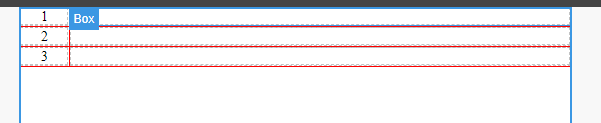
I want to make a question number by for loop when I dropped components,
↓I want final like this image. the div can show for loop number.
↓my component's code
// default html
const questionCom =
`<div class="gjs-row">
<div class="gjs-cell">{{i}}</div> //number variable
<div class="gjs-cell"></div>
</div>`;
const dc = editor.DomComponents;
const textType = dc.getType('text');
editor.BlockManager.add('m2', {
label: "question number",
activate: true,
content: {
type:'m2',
questionCom ,
},
}),
dc.addType('m2', {
model: textType.model.extend({
//...
}
}),
view:textType.view.extend({
onActive(){
//...
},
render(val) {
var a=""
this.model.set('components',
function a1(){ //on onActive I call function a1
for(var i=0;i<3;i++){
a+=`<div class="gjs-row"><div class="gjs-cell">`+
val+
`</div><div class="gjs-cell"></div></div>`
}
return a
}
}
return this;
},
})
});
In render, I divided the my default html questionCom from {{i}} into front and back. then,put them in render. {{i}} can perfect to show 1 2 3 in component.
but ,the divided method is not good. HTML can't easy to read and I can't set complex html if I want like↓
<div class="gjs-row"> //one div
<div class="gjs-cell"> //two div
<div class="gjs-row"> //three div
<div class="gjs-cell">{{i}}</div> //four div
<div class="gjs-cell"></div>
</div>
</div>
<div class="gjs-cell"></div>
</div>
Have any better method can solve my question? Thanks!
Answers (1)
Use the questionCom you're passing to the model (use model to update model related logic) and I'd suggest using API from the Components documentation (eg. textType.view.extend is the old one)
Related Questions and Answers
Continue research with similar issue discussions.
Issue #3683
How to set the component cannot be deleted
Issue #2584
Set a button from Component settings active on click
So i made a custom countdown with a button The button set the countdown but i want to make the button active like other elements on click....
Issue #1723
[QUESTION] replacing particular text in dropped component
Hi, I get the value from custom traits from what I entered but I don't know how to change the particular value in dropped component and ren...
Issue #3414
Component model is not reset when create new drag
When dragging a component from right panel component model doesn't set to default value but has value of previously added component
Paid Plugins That Match This Issue
Curated by issue keywords and label relevance to help you ship faster.
Loading paid plugin recommendations...
Check the open-source GrapesJS plugins on GitHub or run a quick search in our free catalog.
Browse free plugins →Premium plugins ship with support, regular updates, and production-ready features — save days of integration work.
Browse premium plugins →Browse Plugin Categories
Jump directly to plugin category pages on the marketplace.