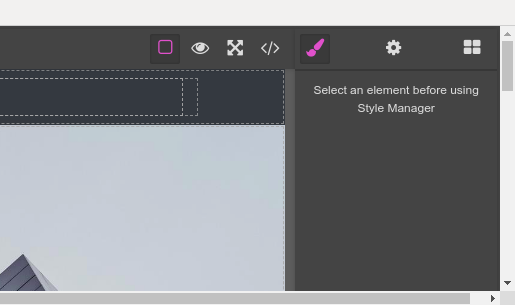
Create a new button in the panel manger
Question
I want to add a new button after the settings icon.

and I used the following code to create the button.but its not working
var panelManager = editor.Panels; var newButton = panelManager.addButton("myNewPanel", { id: "myNewButton", attributes: { title: "Edit Menu", class: "fa fa-sort-desc" }, active: true });
Answers (1)
Related Questions and Answers
Continue research with similar issue discussions.
Issue #1695
Adding new trait to Video component
I want to add a new trait for existing VIDEO '' component. I follow the docs and I didn't find what I want. Now I got the new trait added t...
Issue #1514
How to add video block on blockManager
Hello All. i want to add a video block on blockmanager same as mentioned on below snapshot i am using following code for adding video block...
Issue #692
After pull the new commit, the grapesjs not working on IE and show following error.
Hi @artf , After pull the new commit, i get the error on IE, can you please take a look for this? Thanks.
Issue #987
[BUG/Question] Dropdown indicator not displayed for a custom trait
Hello, the dropdown (select) element arrow indicator icon is not rendered when adding a custom trait to a component: I'm using following co...
Paid Plugins That Match This Issue
Curated by issue keywords and label relevance to help you ship faster.
Loading paid plugin recommendations...
Check the open-source GrapesJS plugins on GitHub or run a quick search in our free catalog.
Browse free plugins →Premium plugins ship with support, regular updates, and production-ready features — save days of integration work.
Browse premium plugins →Related tutorials
In-depth guides on the same topic.
Tutorial
Embed GrapesJS in Your SaaS: A Weekend Guide
Embed GrapesJS in your SaaS and ship a white-label page builder over a weekend. Honest tradeoffs, real code, and the plugins that close the UX gap.
Tutorial
Find the Right GrapesJS Plugin in Seconds: Smarter Discovery Is Live
We're shipping a set of discovery upgrades. New label filters, a proper compatibility switch for GrapesJS vs Studio, one-click and a smarter sort bar.
Tutorial
Why use grapesjs shadcn for your template builder
Skip months of editor plumbing and start with a fully working visual builder — polished UI included.
Browse Plugin Categories
Jump directly to plugin category pages on the marketplace.