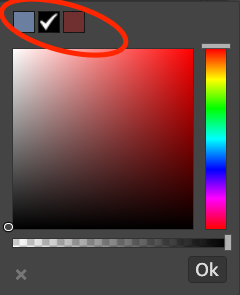
颜色选择器的默认颜色
“''js Grapesjs.init({ ... colorPicker: { 调色板:[ ['#00000','#ff0000','#ff8000','#ffff00','#008000','#0000ff','#4b0082'] ], } }) ```
阅读下方完整回答 ↓问题
有没有办法设置颜色选择器顶部显示的默认颜色数量?
回答(3)
“''js Grapesjs.init({ ... colorPicker: { 调色板:[ ['#00000','#ff0000','#ff8000','#ffff00','#008000','#0000ff','#4b0082'] ], } })
谢谢! 这听起来可能很傻,但这有没有相关文档?我在官方文档里没找到
不,遗憾的是还没有,想法是让颜色选择器可替换,所以我计划在新API准备好后记录下来
相关问答
通过相似的问题讨论继续研究。
问题 #3250
Layer labels
@artf我很喜欢和GJS合作。我还有最后一件事希望你能帮忙。 如果能在图层管理器中自定义标签会非常有帮助。我到处找过,但都没找到。 默认显示“文本”和“框”的方式,对于想要高效导航来说帮助不大。 <img width=“204” alt=“截图 2021-01-28 07 2...
问题 #3560
Customize Blocks Styles - grapesjs Angular
我刚接触 grapes js,想让拖拽时的方块风格不同 例如图像块 1 - 当未被拖拽或悬停时,取样式A。 2- 当滑鼠采用样式B时。 3- 拖拽时,当它越过画布时,取出风格C。 有人能帮我解决这个问题吗? 谢谢  可复制演示链接 https://grapesjs.com/demo.html 描述一下那个虫子 如何复现这个漏洞?将标签块拖放到编辑器内容中点击顶部的...
问题 #3444
RemoveButton() causing error
你好, 我正在尝试用这个代码编辑器从面板中移除一个按钮。Panels.removeButton(“options”, “fullscreen”)' 。它移除了按钮,但出现了这个错误。 ![捕获](https://user-images.githubusercontent.com...
与此问题匹配的付费插件
根据问题关键词和标签相关性精选,助你更快交付。
正在加载付费插件推荐……
浏览插件分类
直接跳转到市场上的插件分类页面。