:风格经理有一个巨大的+符号
好的,谢谢你的报告,我会在下一个版本中调整它们,目前你可以用这个CSS作为临时修复: “''CSS .gjs-clm-tag-status, .gjs-clm-tag-close { 宽度:12像素; 高度:12像素; } .gjs-clm-tags-btn { 宽度:24px; } ```
阅读下方完整回答 ↓问题
你好,艺术, 风格管理器中的 Classes 属性似乎有问题,一个巨大的加号总是自动显示,无论我在本地使用还是在你的演示中使用。
版本:截至今日为止的最新 浏览器:Mozilla 操作系统:Ubuntu 18.04 Bug:风格管理器上的巨人+
嘿,艺术,更新一下,好像是Mozilla的特点。用 Brave、Opera、Chrome、DuckduckGo 和 Mozilla 在手机上测试,只有 Mozilla 出现了这个问题。
回答(2)
好的,谢谢你的报告,我会在下一个版本中调整它们,目前你可以用这个CSS作为临时修复: “''CSS .gjs-clm-tag-status, .gjs-clm-tag-close { 宽度:12像素; 高度:12像素; } .gjs-clm-tags-btn { 宽度:24px; }
可以在Firefox 72和MS Edge 44.18362.449.0上确认。用网页演示版本0.15.10测试过。几个视图图标大小不正确: 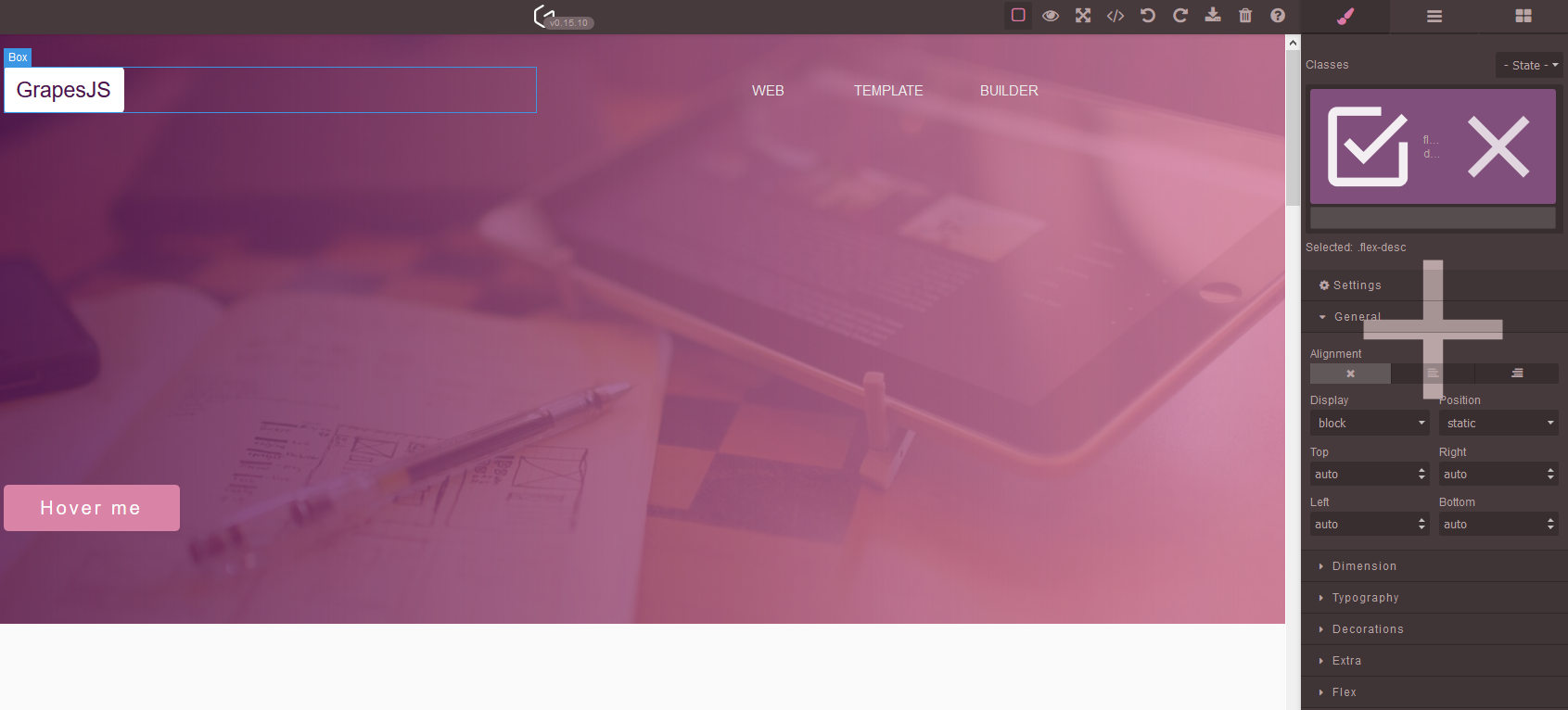
相关问答
通过相似的问题讨论继续研究。
问题 #4732
Tabs behaviour after HTML import
GrapesJS 版本 [X] 我确认使用最新版本 GrapesJS 你用的是什么浏览器? Chrome 107(MacOS) 可复制演示链接 https://grapesjs.com/demo.html 描述一下那个虫子 如何复现这个漏洞?将标签块拖放到编辑器内容中点击顶部的...
问题 #4257
Background modification doesn't work for non-images
GrapesJS 版本 [X] 我确认使用最新版本 GrapesJS 你用的是什么浏览器? Chrome v100 可复制演示链接 https://grapesjs.com/demo.html 描述一下那个虫子 如何复现这个漏洞?点击任意组件,在样式管理器中滚动到装饰>背景尝试...
问题 #4173
Text element does not work properly
GrapesJS 版本[X] 我确认使用最新版本 GrapesJS你用的是什么浏览器? Chrome v98可复制演示链接 https://grapesjs.com/demo.html描述一下那个虫子 我打开了一个笔记本(Win11) 我在记事本上写了:测试 [回车] 测试 [...
问题 #3986
Cannot read properties of undefined (reading 'uploadFile')
GrapesJS 版本 [X] 我确认使用最新版本 GrapesJS 你用的是什么浏览器? Chrome v96.0.4664.45 可复制演示链接 https://codesandbox.io/s/react-redux-toolkit-application-forked-...
与此问题匹配的付费插件
根据问题关键词和标签相关性精选,助你更快交付。
正在加载付费插件推荐……
浏览插件分类
直接跳转到市场上的插件分类页面。