组件中的ID样式
你可以切换职业,这会改变样式选择器 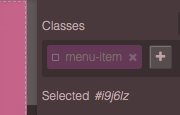
阅读下方完整回答 ↓问题
我该如何设置组件样式?我是按id而不是按类来取的
回答(2)
你可以切换职业,这会改变样式选择器 
我遇到的主要问题是,我试图在我制作的一个组件中做调整大小,但如果两个组件大小相等,当我调整其中一个组件时,另一个也会做同样的调整。所以,我认为我需要通过ID来管理它们的样式,而不是按类别。 这是我的代码: 'const buttonComponent = { 名称:“button-bk”, 数据:{ ID:“按钮”, 标签:“纽扣”, 分类:“基本组件”, 可拖拽:确实, 内容: '<button class=“btn-builder” data-gjs-draggable=“.cell” data-gjs-resizable='{“tl”:0,“tc”:0,“tr”:0,“cl”:0,“c...
相关问答
通过相似的问题讨论继续研究。
问题 #3770
Improve and fix absolute dragMode
GrapesJS 版本 [X] 我确认使用最新版本 GrapesJS 你用的是什么浏览器? Chrome v93 可复制演示链接 https://codepen.io/damnslow/pen/yLXXOxQ 描述一下那个虫子 如何复现这个漏洞?选择两个元素使用拖曳图标拖曳 预...
问题 #6685
自定义组件样式在删除和重新添加后不会被应用
GrapesJS版本 [x] 我确认使用最新版本的GrapesJS 你用的是什么浏览器? Chrome v143.0.7499.193 可复制演示链接 https://codesandbox.io/p/sandbox/2l3887 描述一下那个虫子 如何复现这个漏洞? 打开页面...
问题 #3622
I18n functionality
版本: 最新 你能重现演示中的bug吗?[] 是的[ ] 不 预期的行为是什么? 到编辑器。I18n.setLocale(“es”)在运行时工作。 详细描述那个漏洞 我不知道这是个bug还是本来就不该这样,另外,我对Backbone了解不够,不知道是否可行,但当使用编辑器时,I...
问题 #6663
符号在逐步加载页面时会断裂(实例丢失__symbol链接)
这里有一段展示这个bug的视频: https://github.com/user-attachments/assets/0fdc76ed-cee5-4481-98b1-cbbf52572b31 GrapesJS版本 [x] 我确认使用最新版本的GrapesJS 你用的是什么浏览...
与此问题匹配的付费插件
根据问题关键词和标签相关性精选,助你更快交付。
正在加载付费插件推荐……
浏览插件分类
直接跳转到市场上的插件分类页面。