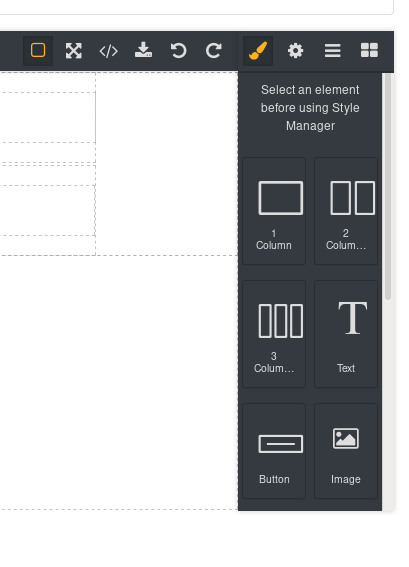
How to change the default selected panel?
thanks @naveen-15697 your solution works pretty awesome! well done. @romariolopezc does this suit your situation? as suggested by @naveen-15697 you have to go like this: and the button ids for `views` panel are:open-smopen-tmopen-layersopen-blocks cheers!
Read full answer below ↓Question
I'm trying to use defaultCommand: 'open-blocks' but the style manager is the default selected one
Thanks!
Answers (3)
thanks @naveen-15697 your solution works pretty awesome! well done. @romariolopezc does this suit your situation? as suggested by @naveen-15697 you have to go like this:
editor.on('load', () => {
const blockBtn = editor.Panels.getButton('views', 'open-layers');
blockBtn.set('active', 1);
})
and the button ids for views panel are:
- open-sm
- open-tm
- open-layers
- open-blocks
cheers!
@pouyamiralayi it doesn't behave as expected.
If I use
editor.runCommand('open-blocks')on load, the components icon is not selected. Is appended to the bottom of the style manager
Here the screenshots
@romariolopezc , Instead for running the command. Try activating blocks button on load. const blockBtn = editor.Panels.getButton('panel-id', 'block-button-name'); blockBtn.set('active', 1);
@pouyamiralayi @naveen-15697 it works!!
I use it outside of the load, after initializing grapesjs. If I use it on load then I see a small delay when changing from the style manager to open-blocks. If its after the .init({..}) then when it renders is selected
Related Questions and Answers
Continue research with similar issue discussions.
Issue #3294
FEAT: Adding options to properties list array in style manager
Hi, How can I add buildProps to properties list such that when an option is selected, the properties of that option will be displayed An ex...
Issue #631
How to refresh Classes view for active Component in the Style Manager
I'm using a trait (type=select) to change the class of a component (a "column" component, so classes representing width 1-12). After I have...
Issue #2514
[Question]: How to change device from dropdown to icon
I'm trying to replace the dropdown with icon for the devices following the example in the newsletter template yet it doesn't work.
Issue #3255
Custom Style Manager
Hi @artf I am trying to change the type and input values of display property like this way -: But on style-manager Button are not visible....
Paid Plugins That Match This Issue
Curated by issue keywords and label relevance to help you ship faster.
Loading paid plugin recommendations...
Check the open-source GrapesJS plugins on GitHub or run a quick search in our free catalog.
Browse free plugins →Premium plugins ship with support, regular updates, and production-ready features — save days of integration work.
Browse premium plugins →Related tutorials
In-depth guides on the same topic.
Tutorial
How to Build a Production GrapesJS Editor: The Complete Walkthrough of Brief, Preset, Plugins, and Services
A complete walkthrough of building a production GrapesJS editor: how to choose a preset, pick plugins, and scope setup services without burning a sprint.
Tutorial
Embed GrapesJS in Your SaaS: A Weekend Guide
Embed GrapesJS in your SaaS and ship a white-label page builder over a weekend. Honest tradeoffs, real code, and the plugins that close the UX gap.
Tutorial
Big Updates: TinyMCE 8 and Placeholder 2.0 for GrapesJS
In May we shipped major updates to two of our most popular GrapesJS plugins — TinyMCE Inline Text Editor and Placeholder.
Browse Plugin Categories
Jump directly to plugin category pages on the marketplace.