Dragging from toolbar can be off (dragMode)
Oh, I tried to find it before reporting but I couldn't. Thanks. I'll close this one then.
Read full answer below ↓Question
Here is a working demo of the issue
Steps to reproduce:
- Select a component
- Try dragging it from the toolbar
You can see that immediately the component jumps to the left. Although it works fine if you try dragging the component by itself (and not using toolbar)
This only happens if Grapesjs is loaded from a with margin and doesn't start from x:0
The reason it happens is this:
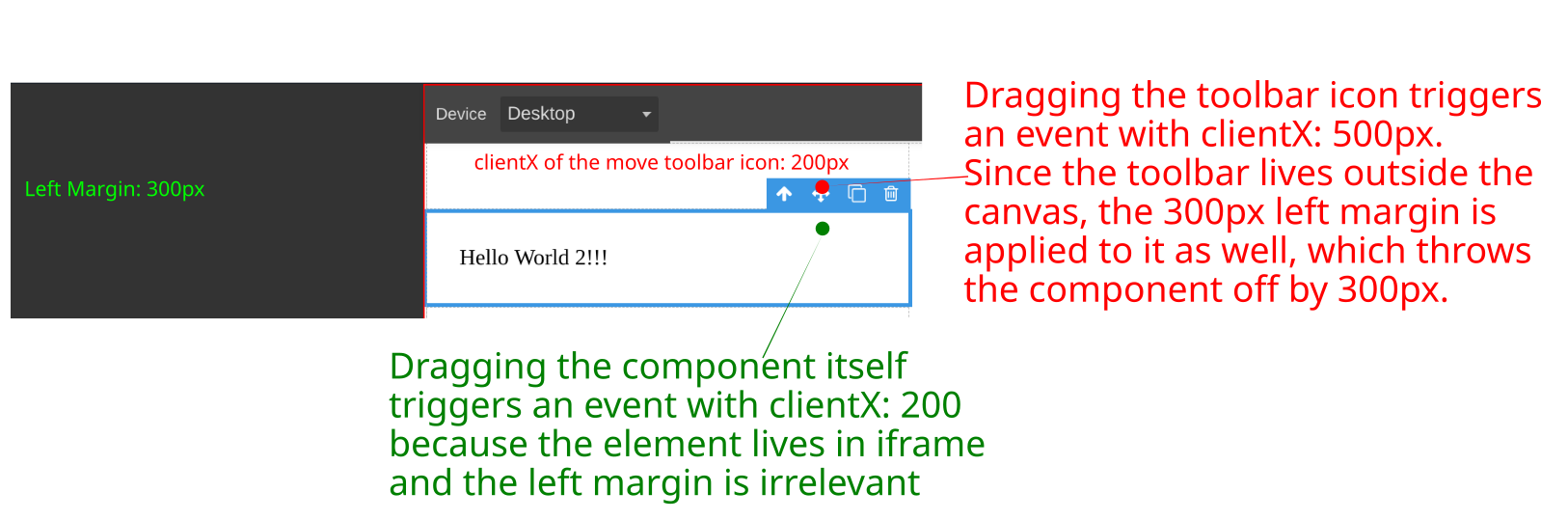
In both cases of dragging from toolbar or component itself, the tlb-move command is called.
tlb-move accepts an event argument and the positioning of the element is calculated using event.clientX.
When you drag the component, sine the component is inside the iframe, it's clientX is relevant to the document and all goes fine.
But the toolbar button doesn't live on the canvas/iframe. Therefore, an event originating from ToolbarButtonView is relevant to the page, not to the canvas.
Here is a visual description:

The ideal solution would be to calculate clientX and clientY of ToolbarIconView relative to the canvas before passing them to tlb-move command.
If you would accept such patch, I can get started on one.
Answers (3)
Oh, I tried to find it before reporting but I couldn't. Thanks. I'll close this one then.
@emilsedgh there is an open discussion about this here
this's fixed in the last release right?
I need a solution when i drag outside of iframe in mobile devices
Related Questions and Answers
Continue research with similar issue discussions.
Issue #5173
editor.Css.setRule API not working as expected, it is not updating the rule existing rule.
GrapesJS version [X] I confirm to use the latest version of GrapesJS What browser are you using? Version 112.0.5615.137 (Official Build) (a...
Issue #4323
Performance issue while dragging component to canvas when you have 2k component on canvas
GrapesJS version[X] I confirm to use the latest version of GrapesJSWhat browser are you using? Google Chrome Version 101.0.4951.41 (Officia...
Issue #6458
sector.setName doesn't work
GrapesJS version [x] I confirm to use the latest version of GrapesJS What browser are you using? Chrome Reproducible demo link https://jsfi...
Issue #6324
sorter.setDragHelper is not a function on block drag
GrapesJS version[X] I confirm to use the latest version of GrapesJSWhat browser are you using? 131.0.6778.86Reproducible demo link https://...
Paid Plugins That Match This Issue
Curated by issue keywords and label relevance to help you ship faster.
Loading paid plugin recommendations...
Check the open-source GrapesJS plugins on GitHub or run a quick search in our free catalog.
Browse free plugins →Premium plugins ship with support, regular updates, and production-ready features — save days of integration work.
Browse premium plugins →Related tutorials
In-depth guides on the same topic.
Tutorial
Big Updates: TinyMCE 8 and Placeholder 2.0 for GrapesJS
In May we shipped major updates to two of our most popular GrapesJS plugins — TinyMCE Inline Text Editor and Placeholder.
Tutorial
GrapesJS vs Webflow vs Builder.io vs Puck: Which Visual Builder to Choose in 2026
A practitioner's 2026 comparison of GrapesJS, Webflow, Builder.io, and Puck — pricing, AI features, lock-in, and a one-line rule for picking the right one
Tutorial
Big news from DevFuture — we just repriced everything
Hey GrapesJS community 👋 we just repriced all prices on plugins.
Browse Plugin Categories
Jump directly to plugin category pages on the marketplace.