预览模式不会运行脚本
问题
大家好, 我正在查看Grapesjs的相关产品 在编辑器中允许脚本并写下这个简单的例子后 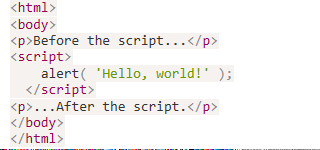 我按下了导入键,果然看到了Hello World,这很棒。 但是使用预览模式时,我没有看到警报(或者我尝试过的其他替代提醒的方法)。 我该怎么让它成功? 我需要配置什么才能在预览模式下执行脚本吗? 谢谢你的帮助!
回答(1)
脚本是可以工作的,问题是你的脚本已经在编辑器里执行过,预览模式没有重新渲染内容...... 对于任何自定义行为,我建议你自己创建一个预览命令
相关问答
通过相似的问题讨论继续研究。
问题 #1507
如何在 Grapesjs 的默认面板中用自定义命令添加自定义按钮
我已经把Grapesjs集成到了Angular6。 我看到的是默认面板,屏幕顶部出现了一个选择框; 我想要一个自定义按钮,带有我自己自定义的命令,放在默认面板上。 我想添加一个按钮,看起来像下面用红色标出的那样。 ![6666666](https://user-images.g...
问题 #519
默认情况下没有任何阻挡
使用这段代码 我用编辑器,但没有任何区块。我也没能理解屏幕尺寸的图标,但其他图标是有的。正如你所见,CSS 正在加载,因为整体布局是正确的。 ![图片](https://user-images.githubusercontent.com/438493/32779136-9e79...
问题 #1575
错误的模型通过了“component:styleUpdate”事件
“component:styleUpdate”事件中的模型与“component:selected”事件中的模型不同。我本以为点击组件后更改样式时,它们应该是一样的。https://jsfiddle.net/szLp8h4n/355/打开控制台。选择“hello world”文...
问题 #3250
Layer labels
@artf我很喜欢和GJS合作。我还有最后一件事希望你能帮忙。 如果能在图层管理器中自定义标签会非常有帮助。我到处找过,但都没找到。 默认显示“文本”和“框”的方式,对于想要高效导航来说帮助不大。 <img width=“204” alt=“截图 2021-01-28 07 2...
与此问题匹配的付费插件
根据问题关键词和标签相关性精选,助你更快交付。
正在加载付费插件推荐……
浏览插件分类
直接跳转到市场上的插件分类页面。