Script interpolation for object [QUESTION]
@Ramkumar-Murugesan objects/arrays are not supported yet, we'll add them in the next release. For now, if you need an object/array in the script, create another property with a JSON.stringify version of the original (set a listener on original to update the stringified one)
Read full answer below ↓Question
Hi guys, has I know that we use external string values in script function by assigning the variable with value in custom triats. but I tried to pass the object or array. I didn't get the correct values. i really stuck on it can anyone please help me.
my traits:-
comps.addType(buttonName, {
model: defaultModel.extend({
defaults: Object.assign({}, defaultModel.prototype.defaults, {
draggable: '*',
droppable: false,
myModelCount: 5,
myModelPropName: { name: 'age' },
script: function () {
const first = '{[ myModelPropName ]}';
const test = JSON.stringify(first);
console.log('screens global variable ----333-- ', JSON.parse(test));
const mycount = '{[ myModelCount ]}';
const initAgGrid = () => {
console.log('inside of ----- ', mycount);
// const columnDefs = [];
for (let i = 0; i < 5; i++) {
console.log(' for loopppp ----- ', i);
}
const columnDefs = [
{
headerName: 'A',
field: 'a',
sortable: true,
colId: 'col1_id'
},
{
headerName: 'B',
field: 'b.name',
sortable: true,
colId: 'col2_id'
},
{
headerName: 'C',
field: 'c.name',
sortable: true,
colId: 'col3_id'
},
{
headerName: 'D',
field: 'd.name',
sortable: true,
colId: 'col4_id'
},
{
headerName: 'E',
field: 'e.name',
sortable: true,
colId: 'col5_id'
}
];
function createRowData() {
const rowData = [];
for (let i = 0; i < 100; i++) {
// create sample row item
const rowItem = {
// is is simple
a: 'aa' + Math.floor(Math.random() * 10000),
// but b, c, d and e are all complex objects
b: {
name: 'bb' + Math.floor(Math.random() * 10000)
},
c: {
name: 'cc' + Math.floor(Math.random() * 10000)
},
d: {
name: 'dd' + Math.floor(Math.random() * 10000)
},
e: {
name: 'ee' + Math.floor(Math.random() * 10000)
},
f: {
name: 'ee' + Math.floor(Math.random() * 10000)
}
};
rowData.push(rowItem);
}
return rowData;
}
this.gridOptions = {
defaultColDef: {
editable: true
},
columnDefs: columnDefs,
rowData: createRowData(),
components: {
boldRenderer: function (params) {
return '<b>' + params.value.name + '</b>';
}
},
onGridReady: function (params) {
params.api.sizeColumnsToFit();
window.addEventListener('resize', function () {
setTimeout(function () {
params.api.sizeColumnsToFit();
});
});
},
paginationAutoPageSize: true,
pagination: true,
};
const gridDiv = document.querySelector('#myGrid');
// tslint:disable-next-line:no-unused-expression
new agGrid.Grid(gridDiv, this.gridOptions);
this.gridOptions.cacheQuickFilter = false;
this.gridOptions.api.sizeColumnsToFit();
};
let exists = false;
const url = 'https://unpkg.com/[email protected]/dist/ag-grid-community.min.js';
const scripts = document.getElementsByTagName('script');
for (let i = scripts.length; i--;) {
if (scripts[i].src === url) {
exists = true;
}
}
if (exists) {
initAgGrid();
} else {
const script = document.createElement('script');
script.onload = initAgGrid;
script.src = url;
document.body.appendChild(script);
}
},
traits: [{}]
}),
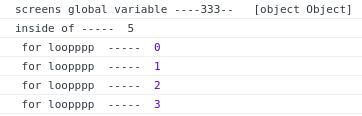
screenshots

in the above screenshot. myModelCount value are printed but the myModelPropName value is shows [object, object] inside of script function.
Answers (1)
@Ramkumar-Murugesan objects/arrays are not supported yet, we'll add them in the next release. For now, if you need an object/array in the script, create another property with a JSON.stringify version of the original (set a listener on original to update the stringified one)
Related Questions and Answers
Continue research with similar issue discussions.
Issue #445
calling a function which is outside the component same as explained in issue #395
I am calling a function which is outside the component same as explained in issue #395 but it is returning a string instead of a function I...
Issue #2194
CKEditor blocks is not editable[QUESTION]
Hi guys, I added the custom CKEditor blocks and its working fine. but the actual issues is I can't able to delete, move or add the traits i...
Issue #3257
block.get('category') returns different results in Chrome and Firefox
Hello, I've hit weird bug when I tried to get block category. block.get('category') returns object in Chrome, but in Firefox the same code...
Issue #3238
[Question]: How to load external javascript,i tried all methods,Useless
I write html strings as blocks, and need to introduce a lot of external scripts and styles, but I tried all the methods, when I drag the bl...
Paid Plugins That Match This Issue
Curated by issue keywords and label relevance to help you ship faster.
Loading paid plugin recommendations...
Check the open-source GrapesJS plugins on GitHub or run a quick search in our free catalog.
Browse free plugins →Premium plugins ship with support, regular updates, and production-ready features — save days of integration work.
Browse premium plugins →Related tutorials
In-depth guides on the same topic.
Tutorial
How to Build a Production GrapesJS Editor: The Complete Walkthrough of Brief, Preset, Plugins, and Services
A complete walkthrough of building a production GrapesJS editor: how to choose a preset, pick plugins, and scope setup services without burning a sprint.
Tutorial
Embed GrapesJS in Your SaaS: A Weekend Guide
Embed GrapesJS in your SaaS and ship a white-label page builder over a weekend. Honest tradeoffs, real code, and the plugins that close the UX gap.
Tutorial
Big Updates: TinyMCE 8 and Placeholder 2.0 for GrapesJS
In May we shipped major updates to two of our most popular GrapesJS plugins — TinyMCE Inline Text Editor and Placeholder.
Browse Plugin Categories
Jump directly to plugin category pages on the marketplace.