Custom html DOM changes does reflected when saving changes to database
Be sure to use the latest version and try to call sync:content on selected component before calling the desired command, eg.
Read full answer below ↓Question
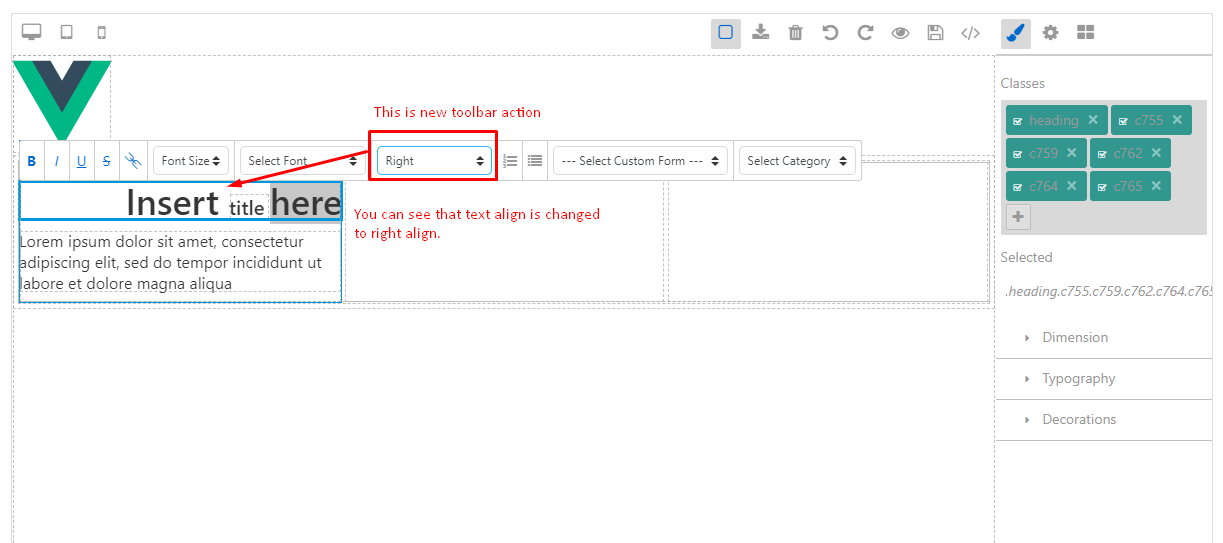
I created new toolbar option called text-align using following code
const rteStudio = studio.RichTextEditor;
rteStudio.add('text-align', {
icon: "<select id=\"textAlignSelector\" class=\"gjs-field lm select\">" +
"<option value=''>Select alignment</option>" +
"<option value=\"left\">Left</option> " +
"<option value=\"center\">Center</option> " +
"<option value=\"right\">Right</option> " +
"</select>",
attributes: { title: 'Text Align'},
event: 'change',
result: (rteStudio, action) => {
var val = action.btn.firstChild.value;
var fontTag = "";
if(action.btn.className && (action.btn.className.indexOf("gjs-rte-active") < 0)) {
action.btn.className += " ".concat("gjs-rte-active");
}
var el = rteStudio.getCurrentEl();
if (el && val != "" ) {
debugger;
if(el.tagName == "SPAN") {
el = el.parentNode;
}
el.style.textAlign = val;
rteStudio.syncActions();
}
//rteStudio.insertHTML(fontTag)
}
});
In order to make above code work, I added following function into grapes.js file :
{
key: "getCurrentEl",
value: function getCurrentEl(value) {
var lastNode;
var doc = this.doc;
var sel = doc.getSelection();
if (sel && sel.rangeCount) {
var node = doc.createElement('div');
var range = sel.getRangeAt(0);
return range.commonAncestorContainer.parentNode;
}
else {
return null;
}
}
}
Due to above code, my changes working in the editor in UI refer:

I am getting html of editor using following code :
studio.runCommand('gjs-get-inlined-html')
Now, the issue is, in the HTML got using above command, I don't see my formatting changes done using above code.
Please help me to fix this issue. Due to this, I can't save changes done using text-align feature into database
Answers (3)
Be sure to use the latest version and try to call sync:content on selected component before calling the desired command, eg.
editor.getSelected().trigger('sync:content');
editor.runCommand('gjs-get-inlined-html')
@artf, Thanks for the answer. I tried with that but unfortunately not working. I am getting that using following code:
studioCommand.add('com-save', {
run: function(studio, sender) {
studio.getSelected().trigger("sync:content")
var studioContent = studio.runCommand('gjs-get-inlined-html');
// Saving studioContent in the database using ajax call
}
});
I already did this but nothing happens. Please correct me if something wrong.
Again, highly appreciate your help on this.
@jadejahardipsinh grapesjs version?
Related Questions and Answers
Continue research with similar issue discussions.
Issue #3218
How to add new HTML element with inline styles?
I would like to add a new HTML element, with inline styles, around the rte.selection(). With the following example, the HTML is OK, but pro...
Issue #2189
[Question] How to add "Ordered/Unordered List" option in rte/custom block
Hi I'm trying to create an ordered list with grapesjs. I tried adding the following to the rte: And this works if my page is pre-filled wit...
Issue #1661
I've created html table and cannot drag new elements to table cells
Hello. if I create html table with next block of code, everything works, I'm able to drop a Quote, for example, to any cell: But next code...
Issue #698
editor.getSelected().toHTML() is not consistent
Hi everyone, I created a new component type, 'html-block', which is a component in which you can add your html code. I added an 'Edit' butt...
Paid Plugins That Match This Issue
Curated by issue keywords and label relevance to help you ship faster.
Loading paid plugin recommendations...
Check the open-source GrapesJS plugins on GitHub or run a quick search in our free catalog.
Browse free plugins →Premium plugins ship with support, regular updates, and production-ready features — save days of integration work.
Browse premium plugins →Related tutorials
In-depth guides on the same topic.
Tutorial
How to Build a Production GrapesJS Editor: The Complete Walkthrough of Brief, Preset, Plugins, and Services
A complete walkthrough of building a production GrapesJS editor: how to choose a preset, pick plugins, and scope setup services without burning a sprint.
Tutorial
GrapesJS Inline RTE Plugins Update: CKEditor 5 v0.1.4 and Froala Inline Text Editor
CKEditor 5 Inline for GrapesJS v0.1.4 fixes Studio SDK toolbar clipping, iframe injection and link balloon bugs. Compare with Froala Inline — both $69.
Tutorial
Embed GrapesJS in Your SaaS: A Weekend Guide
Embed GrapesJS in your SaaS and ship a white-label page builder over a weekend. Honest tradeoffs, real code, and the plugins that close the UX gap.
Browse Plugin Categories
Jump directly to plugin category pages on the marketplace.