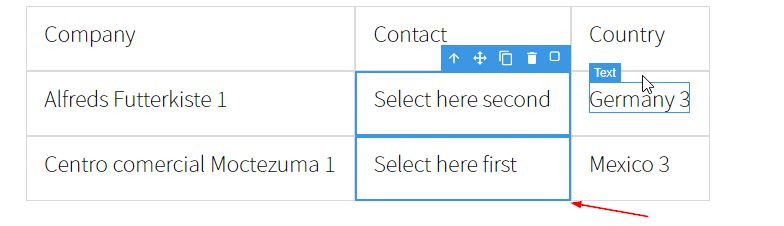
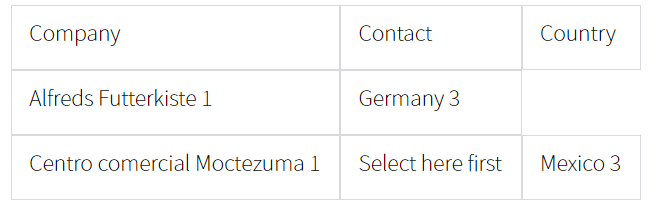
How to remove the components correctly?
I've tried calling setSelected method before removing components, it works! Here is the updated code:
Read full answer below ↓Question
I want to remove the components programmatically, the following is my code snippet.
const Command = editor.Commands.get('select-comp')
editor.Commands.extend('select-comp', {
// Overwrite this private method to make the toolbar conditionally display.
updateToolbar(mod) {
const em = this.config.em
const model = mod == em ? em.getSelected() : mod
if (model) {
const toolbar = model.get('__toolbar') || model.get('toolbar')
const filtered = toolbar.filter(item => item.isAvailable === undefined || item.isAvailable.call(this, em))
model.has('__toolbar') || model.set('__toolbar', toolbar)
model.set('toolbar', filtered)
}
Command.updateToolbar.call(this, mod)
}
})
// ====== ↓ Remove Logic ↓ ======
// Command: Combine the cells
editor.Commands.add('table:table-cells-combine', editor => {
const em = editor.getModel()
const components = editor.getSelectedAll()
// Choose the firstly selected as the primary cell.
const component = components[0]
// Keep this component, but remove other selected.
components.slice(1, components.length).forEach(item => item.remove())
// Update the attributes
const [rowspan, colspan] = component.get('__span') || []
component.setAttributes({rowspan, colspan})
em.setSelected(component)
})
// Extend the cell toolbar items.
editor.DomComponents.addType('cell', {
extendFn: ['initToolbar'],
model: {
initToolbar() {
const model = this
var tb = [...model.get('toolbar') || []]
// Tool: combine the cells.
tb.push({
attributes: { class: 'fa fa-square-o' },
command: ed => ed.runCommand('table:table-cells-combine'),
isAvailable (ed) {
const components = ed.getSelectedAll()
components.forEach(component => component.unset('__span'))
if (components.length > 1) {
const [ tl, br ] = components
.reduce((r, comp) => {
const [ tl, br ] = r
const parent = comp.parent()
if (parent) {
// ====== ↓ Issue ↓ ======
// The parent may be undefined, ex: the component was removed before the undo command(Ctrl + Z).
const rowIndex = parent.index()
const columnIndex = comp.index()
tl[0] < rowIndex || (tl[0] = rowIndex)
tl[1] < columnIndex || (tl[1] = columnIndex)
br[0] > rowIndex || (br[0] = rowIndex)
br[1] > columnIndex || (br[1] = columnIndex)
}
return r
}, [[], []])
const rowspan = br[0] - tl[0] + 1
const colspan = br[1] - tl[1] + 1
const selected = components[0]
selected.set('__span', [rowspan, colspan])
return components.length === colspan * rowspan
}
return false
}
})
model.set('toolbar', tb)
}
}
})
After the components have been removed, then undo the delete actions (Ctrl + Z), do the multiple selections with the shift key will get the error Uncaught TypeError: Cannot read property 'indexOf' of undefined.

My question is: How to remove the components correctly?
Answers (3)
I've tried calling setSelected method before removing components, it works!
Here is the updated code:
// Command: Combine the cells
editor.Commands.add('table:table-cells-combine', editor => {
const em = editor.getModel()
const components = editor.getSelectedAll()
// Keep the first selected component, but remove others.
const component = components[0]
const others = components.slice(1, components.length)
// Update the attributes
const [rowspan, colspan] = component.get('__span') || []
component.setAttributes({rowspan, colspan})
// Reset the selection status before removing other components.
em.setSelected(component)
// Remove the components, the following two ways both works.
// const parent = component.parent()
// parent.components(component.collection.filter(comp => !others.includes(comp)))
others.forEach(item => item.remove())
})
@joselin-bizmatesph I haven't been touching it for 3 years, but I guess it's similar to the case I had encountered. From the snapshot you posted, seems you removed the wrong components and you might need to double check the rowspan and the colspan of the kept component.
@zhangyanwei I encountered the same issue, I have some issues when I try to merge the cell from bottom to top. Have you already fixed the issue?

Related Questions and Answers
Continue research with similar issue discussions.
Issue #3688
How to customize a component
I read this document https://grapesjs.com/docs/modules/Components.html#define-custom-component-type and tried to write the following code....
Issue #3347
How can I get Uncompressed JS code for me to edit?
Hi, thank you for reviewing my problem. I want to use my own JSEditor to edit html、css and js. 1、First, I use getHtml, getCss, getJs to dis...
Issue #924
[Bug]: calling 'preview' command not working correctly
This is a piece of code that i am an using: this.editor = grapesjs.init(this.config) const commandManager = this.editor.Commands commandMan...
Issue #4191
We are trying to store the data from grapesJS editor in Angular 10 application, getting CORS error, image attached below
GrapesJS version [x] I confirm to use the latest version of GrapesJS What browser are you using? Chrome 99.0.4844.5 Reproducible demo link...
Paid Plugins That Match This Issue
Curated by issue keywords and label relevance to help you ship faster.
Loading paid plugin recommendations...
Check the open-source GrapesJS plugins on GitHub or run a quick search in our free catalog.
Browse free plugins →Premium plugins ship with support, regular updates, and production-ready features — save days of integration work.
Browse premium plugins →Browse Plugin Categories
Jump directly to plugin category pages on the marketplace.