如何在编辑器中禁用脚本?
问题
你好@artf, 我需要在编辑器里禁用所有脚本(组件脚本和其他脚本),脚本应该只有在点击“预览按钮”时才会运行。 有什么方法可以做到吗?
回答(3)
你好@artf,
谢谢你的回复。现在我正在移除所有脚本,只在预览模式下运行。
不,目前没有公开的API可以做到这一点
你好@sdrebel如果你能分享你的解决方案,我会很感激。 另外,在编辑器允许脚本后,我复制了这个示例导入 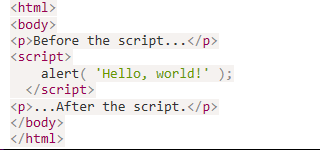 按下导入键,看到了Hello World。 但是 使用预览模式时我看不到提醒。 我需要配置什么才能在预览模式下执行脚本吗? 我下一步想让编辑器不要执行JS,你是怎么处理的?通过添加CDATA吗? 谢谢你的帮助!
相关问答
通过相似的问题讨论继续研究。
问题 #3250
Layer labels
@artf我很喜欢和GJS合作。我还有最后一件事希望你能帮忙。 如果能在图层管理器中自定义标签会非常有帮助。我到处找过,但都没找到。 默认显示“文本”和“框”的方式,对于想要高效导航来说帮助不大。 <img width=“204” alt=“截图 2021-01-28 07 2...
问题 #3515
Gjs-selected Style is Hardcoded
定义如下: https://github.com/artf/grapesjs/blob/88249c38577852dc3c42047356a70a12066ee6ca/src/canvas/view/FrameView.js#L303-L306 总是附加在框架上。它包含选定元...
问题 #3463
Inspector overflow broken
警告 请阅读并遵循接下来的三步,然后在发布问题前删除它们遵守贡献指南 https://github.com/artf/grapesjs/blob/master/CONTRIBUTING.md先快速搜索一下,看看有没有人没开同样的问题所有相关陈述/问题都必须填写/回答,否则问题可...
问题 #3268
How to add javascript in the html without sanitization?
@artf,我正在接收用户的JavaScript输入。我需要在模板HTML里添加这个JavaScript,但它会被净化。 有没有办法关闭消毒功能?(我对你提到的#3245问题没有意见)或者你能在编辑器里添加类似“allowSanitization: false”这样的属性吗?...
与此问题匹配的付费插件
根据问题关键词和标签相关性精选,助你更快交付。
正在加载付费插件推荐……
浏览插件分类
直接跳转到市场上的插件分类页面。