Issue #1529💬 AnsweredOpened October 19, 2018by krunal0391 reactions

Componet is not editable

快速解答by artf1

traits are not visible when clicked on component. Because you're clicking another component (the inner one, which has its own traits), if you don't need that component to be selectable you can use selectable property <div data-gjs-selectable="false">...

Read full answer below ↓

Question

代码片段TEXT
I have custom component and have applied editable=true but child element are not editable, I even tried adding data-gjs-editable=true and also try to use basic component blocks but entire component is not editable.

`var sliderType = 'hsbc-slider-1';

    var createSliderComponent = function (comps, defaultModel, defaultView) {

        var defaultType = comps.getType("default");
        var defaultModel = defaultType.model;
        var defaultView = defaultType.view;

        comps.addType(sliderType, {
            // Define the Model
            model: defaultModel.extend({
                // Extend default properties
                defaults: Object.assign({}, defaultModel.prototype.defaults, {

                    type: sliderType,
                    tagName: 'div',                    
                    copyable: true,
                    removable: false,
                    stylable: false,
                    resizable: false,
                    editable: true,
                    badgable: true,
                    highlightable: true,
                    attributes: {
                        'class': 'slider-container',
                        'data-gjs-type': sliderType
                    }
                }),                
            }, {
                isComponent(el) {
                    if (el.getAttribute &&
                        el.getAttribute('data-gjs-type') == sliderType) {
                        return {
                            type: sliderType
                        };
                    }
                }
            }),
            // Define the View
            view: defaultView
        });
    };`

`{
                id: sliderType + "_block",
                label: "Slider",
                category: "Layout",
                attributes: {
                    class: "gjs-block sliderbox-icon",
                    "data-gjs-hover-img": "https://team.global.hsbc/sites/LearningDevLib/hsbc_uni_images/Icons/grapes-js/slider.png"
                },
                content:  {
                    type: 'hsbc-slider-1',
                    activeOnRender: 1,
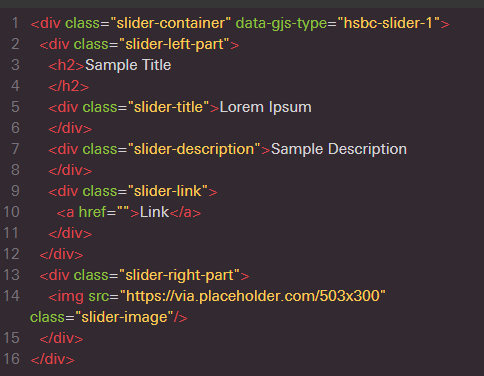
                    content : '<div class="slider-left-part"><h2 data-gjs-type="text">Sample Title</h2><div class="slider-title" data-gjs-type="text">Lorem Ipsum</div><div class="slider-description" data-gjs-type="text">Sample Description</div><div class="slider-link"><a href="" data-gjs-type="link">Link</a></div></div><div class="slider-right-part"><img data-gjs-type="image" class="slider-image" src="https://via.placeholder.com/503x300"></div>'
                }
            }`


![capture](https://user-images.githubusercontent.com/11716808/47214169-060e7a00-d395-11e8-8f7e-e53e8a7ec931.PNG)

Answers (3)

artfOctober 26, 2018

traits are not visible when clicked on component.

Because you're clicking another component (the inner one, which has its own traits), if you don't need that component to be selectable you can use selectable property <div data-gjs-selectable="false">...

artfOctober 19, 2018

You should put the HTML not inside content(in the block definition) but components

krunal039October 22, 2018
代码片段TEXT
@artf I have put inside components and if I do that way than traits are not visible when clicked on component.
![capture](https://user-images.githubusercontent.com/11716808/47285410-bc1ad380-d5e2-11e8-9ca9-57d18e7a4785.PNG)


`var sliderType = 'hsbc-slider-1';

    var createSliderComponent = function (comps, defaultModel, defaultView) {

        var defaultType = comps.getType("default");
        var defaultModel = defaultType.model;
        var defaultView = defaultType.view;

        comps.addType(sliderType, {
            // Define the Model
            model: defaultModel.extend({
                // Extend default properties
                defaults: Object.assign({}, defaultModel.prototype.defaults, {

                    type: sliderType,
                    tagName: 'div',
                    copyable: true,
                    removable: false,
                    stylable: false,
                    resizable: false,
                    editable: true,
                    badgable: true,
                    highlightable: true,
                    sTitle: '',
                    sHeader: '',
                    sDescription: '',
                    sLink: '',
                    sLinkTitle: '',
                    sSrc: '',
                    sContent: '<div class="slider-left-part"><h2>Sample Title</h2><div class="slider-title">Lorem Ipsum</div><div class="slider-description">Sample Description</div><div class="slider-link"><a href="">Link</a></div></div><div class="slider-right-part"><img class="slider-image" src="https://via.placeholder.com/503x300"></div>',
                    sHeader: '',
                    attributes: {
                        'class': 'slider-container',
                        'data-gjs-type': sliderType
                    },
                    traits: [{
                            type: 'text',
                            label: 'Header Text',
                            name: 'sHeader',
                            placeholder: 'eg. Welcome',
                            changeProp: 1
                        }, {
                            type: 'text',
                            label: 'Title',
                            name: 'sTitle',
                            placeholder: 'eg. HSBC Link',
                            changeProp: 1
                        }, {
                            type: 'text',
                            label: 'Description',
                            name: 'sDescription',
                            placeholder: 'eg. Hear what our leaders are saying about HSBC University – and how it can help you learn, develop and connect.',
                            changeProp: 1
                        },
                        {
                            type: 'select',
                            label: 'Link Title',
                            name: 'sLink',
                            options: [{
                                value: 'Access',
                                name: 'Access'
                            }, {
                                value: 'Find Out More',
                                name: 'Find Out More'
                            }, {
                                value: 'None',
                                name: 'None'
                            }, {
                                value: 'Read More',
                                name: 'Read More'
                            }, {
                                value: 'Register',
                                name: 'Register'
                            }, {
                                value: 'Role Based Learning',
                                name: 'Role Based Learning'
                            }, {
                                value: 'Visit Website',
                                name: 'Visit Website'
                            }, {
                                value: 'Watch Video',
                                name: 'Watch Video'
                            }],
                            changeProp: 1
                        }, {
                            type: 'text',
                            label: 'Link to open',
                            name: 'sLinkTitle',
                            placeholder: 'eg. https://team.global.hsbc/sites/HSBCUni',
                            changeProp: 1
                        }
                    ]
                }),
                initialize: function initialize(o) {
                    defaultModel.prototype.initialize.apply(this, arguments);
                    if (this.components() && !this.components().length) {
                        this.components(this.get('sContent'));
                    }
                    this.listenTo(this, 'change:sHeader', this.updateContent);
                },
                updateContent: function () {
                    this.find('h2')[0] && this.find('h2')[0].set("content", this.get('sHeader'));
                    this.find('div.slider-title')[0] && this.find('div.slider-title')[0].set("content", this.get('sTitle'));
                    this.find('div.slider-description')[0] && this.find('div.slider-description')[0].set("content", this.get('sDescription'));
                    this.find('a')[0] && this.find('a')[0].set("href", this.get('sLink'));
                    this.find('a')[0] && this.find('a')[0].set("content", this.get('sLinkTitle'));
                    this.find('img')[0] && this.find('img')[0].set("src", this.get('sSrc'));
                }
            }, {
                isComponent(el) {
                    if (el.getAttribute &&
                        el.getAttribute('data-gjs-type') == sliderType || el.getAttribute('') =='slider-container') {
                        return {
                            type: sliderType,
                            content : '<div class="slider-left-part"><h2>Sample Title</h2><div class="slider-title">Lorem Ipsum</div><div class="slider-description">Sample Description</div><div class="slider-link"><a href="">Link</a></div></div><div class="slider-right-part"><img class="slider-image" src="https://via.placeholder.com/503x300"></div>',
                            activeOnRender: 1
                        };
                    }
                }
            }),
            // Define the View
            view: defaultView
        });
    };`

Related Questions and Answers

Continue research with similar issue discussions.

Paid Plugins That Match This Issue

Curated by issue keywords and label relevance to help you ship faster.

View all plugins

Loading paid plugin recommendations...

Free option

Check the open-source GrapesJS plugins on GitHub or run a quick search in our free catalog.

Browse free plugins →
Premium option

Premium plugins ship with support, regular updates, and production-ready features — save days of integration work.

Browse premium plugins →

Related tutorials

In-depth guides on the same topic.

All tutorials →

Browse Plugin Categories

Jump directly to plugin category pages on the marketplace.