Issue #1206💬 AnsweredOpened June 14, 2018by Krishnaasa0 reactions

Issue : Adding scripts inside nested content showing different behavior when compared with a single content ta

快速解答by artf

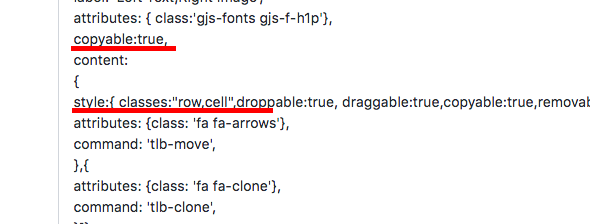
Check your code, it's completly messed up, you're mixing component related stuff inside blocks and then you put everything inside style(???)

Read full answer below ↓

Question

Hi ,

We are actually trying to add a own JS script that can read a file and preview the same on the html. But in doing so by adding a BlockManager we are noticing a different behavior where we are not able to perform actions like remove/copy nor are we able to edit the inner elements.

The content inside the content is considered as a single block element, and we had to follow this approach in order to add the script.

代码片段TEXT
The  following is the snippet that we tried adding  : 
editor.BlockManager.add('image_left_text_right',{
            id: 'LiRt',
            label: 'Left Text,Right Image',            
            attributes: { class:'gjs-fonts gjs-f-h1p'},
            copyable:true,
            content:
            {
                style:{ classes:"row,cell",droppable:true, draggable:true,copyable:true,removable:true,toolbar: [{
              attributes: {class: 'fa fa-arrows'},
              command: 'tlb-move',
              },{
              attributes: {class: 'fa fa-clone'},
              command: 'tlb-clone',
              }]},                
                content:                 
                `
                <div class="row" data-gjs-custom-name="Row">
                    <div class="cell" data-gjs-draggable="false" data-gjs-droppable=".buttonCss" data-gjs-droppable="false" data-gjs-copyable="false"  data-gjs-removable="false" data-gjs-custom-name="Cell">                       
                      <h1 data-gjs-droppable="false" data-gjs-draggable="false" data-gjs-copyable="false"  data-gjs-removable="false">Section Title</h1>                          
                      <div class="cell" data-gjs-draggable="false" data-gjs-droppable="false" data-gjs-copyable="false"  data-gjs-removable="false" data-gjs-custom-name="Cell padd">Passage Description</div>                          
                    </div>         
                    <div class="cell" data-gjs-draggable="false" data-gjs-droppable="false" data-gjs-copyable="false"  data-gjs-removable="false" data-gjs-custom-name="Cell">
                      <input type="file" accept="image/*" id = "LiRtid" >
                      <img id="output" style="width:250px;height:250px" data-gjs-draggable="false" data-gjs-droppable="false" data-gjs-copyable="false"  data-gjs-removable="false"/>
                    </div>               
                </div>
                `,

              script:        
                ` var input1 = document.getElementById('LiRtid');
                  input1.addEventListener('change', function()
                  {                     
                    var output = document.getElementById('output');
                    alert(output);
                    output.src = URL.createObjectURL(this.files[0]);
                  });`,
              droppable:false,
              draggable:".panel",              
           
              },            
        })

![image](https://user-images.githubusercontent.com/9292835/41405293-1469d2d2-6fe7-11e8-8b30-a673944a5fa1.png)

Any help is appreciated . Thanks in advance!!...

Answers (2)

artfJune 16, 2018

Check your code, it's completly messed up, you're mixing component related stuff inside blocks and then you put everything inside style(???) schermata 2018-06-16 alle 12 58 21

lock[bot]September 17, 2019

This thread has been automatically locked since there has not been any recent activity after it was closed. Please open a new issue for related bugs.

Related Questions and Answers

Continue research with similar issue discussions.

Paid Plugins That Match This Issue

Curated by issue keywords and label relevance to help you ship faster.

View all plugins

Loading paid plugin recommendations...

Free option

Check the open-source GrapesJS plugins on GitHub or run a quick search in our free catalog.

Browse free plugins →
Premium option

Premium plugins ship with support, regular updates, and production-ready features — save days of integration work.

Browse premium plugins →

Related tutorials

In-depth guides on the same topic.

All tutorials →

Browse Plugin Categories

Jump directly to plugin category pages on the marketplace.