Issue #1204💬 AnsweredOpened June 14, 2018by afaraha84030 reactions

Unknown Error $jscomp is not defined on uploadFile

快速解答by afaraha8403

Hello anyone here. I hate to see all my hours of work in this go to waste. All opinions welcome!

Read full answer below ↓

Question

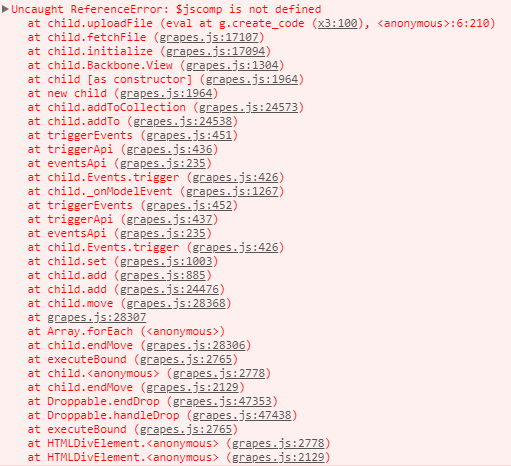
I am facing a weird error that I am unable to properly trace. It happens when i drag and drop an image for upload.

image

When I click on the line "at fetchFile (grapes.js:17107)" I see this function

fetchFile: function fetchFile() {
    var model = this.model;
    var file = model.get('file');

    if (file) {
      var fu = this.em.get('AssetManager').FileUploader();
      fu.uploadFile({
        dataTransfer: { files: [file] }
      }, function (res) {
        var obj = res && res.data && res.data[0];
        var src = obj && obj.src;
        src && model.set({ src: src });
      });
      model.set('file', '');
    }
  },

Please note that I have modified the uploadFile with the below code that I have adapted from the original source

//Asset Manager
    const initialAsset = {
        upload: true, //disable uploads
        assets: assetsImages, //Assets as array
        openAssetsOnDrop: 0, //// Open the asset manager once files are been dropped via the dropzone
        dropzone: false, //Active the dropzone disable/hide the upload dropzone in asset modal
        dropzoneContent: dropzone_content,
        noAssets: 'No&nbsp;<b>assets</b>&nbsp;here, drag to upload', //No assets message
        uploadFile: (e) => {
            // List files dropped
            const files = e.dataTransfer ? e.dataTransfer.files : e.target.files;
            const response = {
                data: [],
            };
            // Unlikely, widely supported now
            if (!FileReader) {
                this.onUploadError(
                    new Error('Unsupported platform, FileReader is not defined')
                );
                return;
            }
            const promises = [];
            const mimeTypeMatcher = /^(.+)\/(.+)$/;
            for (const file of files) {
                // For each file a reader (to read the base64 URL)
                // and a promise (to track and merge results and errors)
                const promise = new Promise((resolve, reject) => {
                    const reader = new FileReader();
                    reader.addEventListener('load', (event) => {
                        let type;
                        const name = file.name;
                        // Try to find the MIME type of the file.
                        const match = mimeTypeMatcher.exec(file.type);
                        if (match) {
                            type = match[1]; // The first part in the MIME, "image" in image/png
                        } else {
                            type = file.type;
                        }
                        // If it's an image, try to find its size
                        if (type === 'image') {
                            const data = {
                                src: reader.result,
                                name,
                                type,
                                height: 0,
                                width: 0,
                            };
                            const image = new Image();
                            image.addEventListener('error', (error) => {
                                reject(error);
                            });
                            image.addEventListener('load', () => {
                                data.height = image.height;
                                data.width = image.width;
                                resolve(data);
                            });
                            image.src = data.src;
                        } else if (type) {
                            // Not an image, but has a type
                            resolve({
                                src: reader.result,
                                name,
                                type,
                            });
                        } else {
                            // No type found, resolve with the URL only
                            resolve(reader.result);
                        }
                    });
                    reader.addEventListener('error', (error) => {
                        reject(error);
                    });
                    reader.addEventListener('abort', (error) => {
                        reject('Aborted');
                    });
                    reader.readAsDataURL(file);
                });
                promises.push(promise);
            }
            Promise.all(promises).then(
                (data) => {
                    response.data = data;
                    //Start bubble upload
                    attachImages(response.data, make_private, attach_to);
                },
                (error) => {
                    //Usage - instance.publishState(string: Exposed state name, Value);
                    instance.publishState('error_messages', error.toString());
                    //Usage - instance.triggerEvent(string: Event's name);
                    instance.triggerEvent('error');
                    console.warn(error);
                }
            );
        },

    };

Your help is greatly appreciated

Answers (3)

afaraha8403June 15, 2018

Hello anyone here. I hate to see all my hours of work in this go to waste. All opinions welcome!

artfJune 16, 2018

When I click on the line "at fetchFile (grapes.js:17107)" I see this function

Which is just a step before you real issue... click on uploadFile step and you will find the issue

lock[bot]September 17, 2019

This thread has been automatically locked since there has not been any recent activity after it was closed. Please open a new issue for related bugs.

Related Questions and Answers

Continue research with similar issue discussions.

Paid Plugins That Match This Issue

Curated by issue keywords and label relevance to help you ship faster.

View all plugins

Loading paid plugin recommendations...

Free option

Check the open-source GrapesJS plugins on GitHub or run a quick search in our free catalog.

Browse free plugins →
Premium option

Premium plugins ship with support, regular updates, and production-ready features — save days of integration work.

Browse premium plugins →

Related tutorials

In-depth guides on the same topic.

All tutorials →

Browse Plugin Categories

Jump directly to plugin category pages on the marketplace.