我该如何设置<body>属性
你好@agungaja,请你指明'exportWrapper: true'的文档吗?不知为何我找不到,我觉得它可能解决了问题,但想看看它的维基!谢谢
阅读下方完整回答 ↓问题
你好,@artf,
在之前的问题#1132中,关于导出“<body my=”attributes“>'代码,我记得是用”exportWrapper: true“完成的。但现在遇到了限制,当它从“''导入属性时,<body>我尝试设置属性却不起作用。我用的是“importWrapper: true”。有什么解决办法吗?
请帮帮我,谢谢:)
图1:导入带有属性的标签正体,编辑代码时缺少该属性 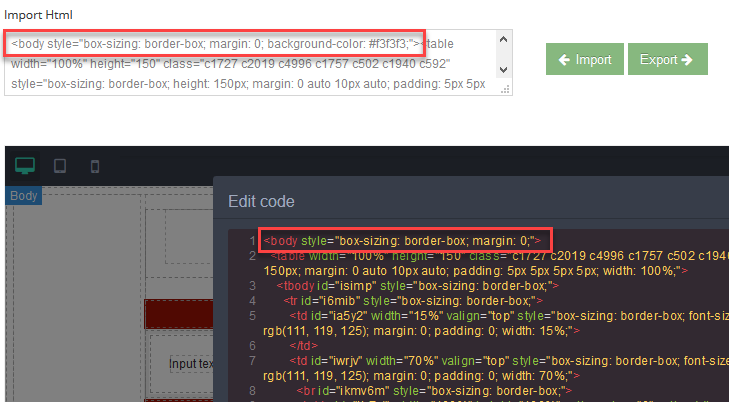
回答(3)
你好@agungaja,请你指明'exportWrapper: true'的文档吗?不知为何我找不到,我觉得它可能解决了问题,但想看看它的维基!谢谢
是的,确实如此,我也找不到。我是在#1132期中才从@artf那里得到的信息。或者我有更少探索性的文档😄。
关键是,为什么内容集会使用 'var initcontent = $('#import_html').val();' 'editor.setComponents(initcontent);' 身体属性“背景色:#f3f3f3;”消失了
@agungaja没有“importWrapper”选项,也不能导入标签<body>“。GrapesJS 期望用户传递内容......而非WRAPPER(大多数情况下是正体),包装器应由其配置定义(https://github.com/artf/grapesjs/blob/dev/src/dom_components/config/config.js#L9-L24);
相关问答
通过相似的问题讨论继续研究。
问题 #1605
我们能在 RTE 中实现粘贴为富文本编辑器选项吗?
嗨@artf我用过这个拖放编辑器,真是太棒了。 我也看了你的文档,尝试扩展富文本编辑器,但卡住了。 正如你看到下面的截图所示,我为富文本编辑器添加了不同的选项 ;' 没有设置任何“body”属性。使用这个命令时,我该如何解决身体标签要被检索的问题?还是有其他方法? 设置背景色为身体时的图...
问题 #1848
页面重新加载后,加号(“+”)按钮不显示。
你好@artf, 当我拖动该区块时,显示了一个加号按钮。保存并重新加载页面后,“+”按钮不显示。我还需要在页面重新加载后显示按钮。请给我一些建议,我该如何解决这个问题? 请查看[jsfiddle](https://jsfiddle.net/sanjib00/o3tvskyn/1...
问题 #1780
如何更改链接变更特性的额外下拉菜单
你好,@artf, 我想为用户提供更多功能,比如用户可以通过默认链接下拉菜单更改任何链接。 ![截图5](https://user-images.githubusercontent.com/25474716/52442186-cfff2c80-2b22-11e9-8f2b-1e...
与此问题匹配的付费插件
根据问题关键词和标签相关性精选,助你更快交付。
正在加载付费插件推荐……
相关教程
关于同一主题的深入指南。
浏览插件分类
直接跳转到市场上的插件分类页面。